Context Switching क्या है? | OS में Process कैसे बदलती है
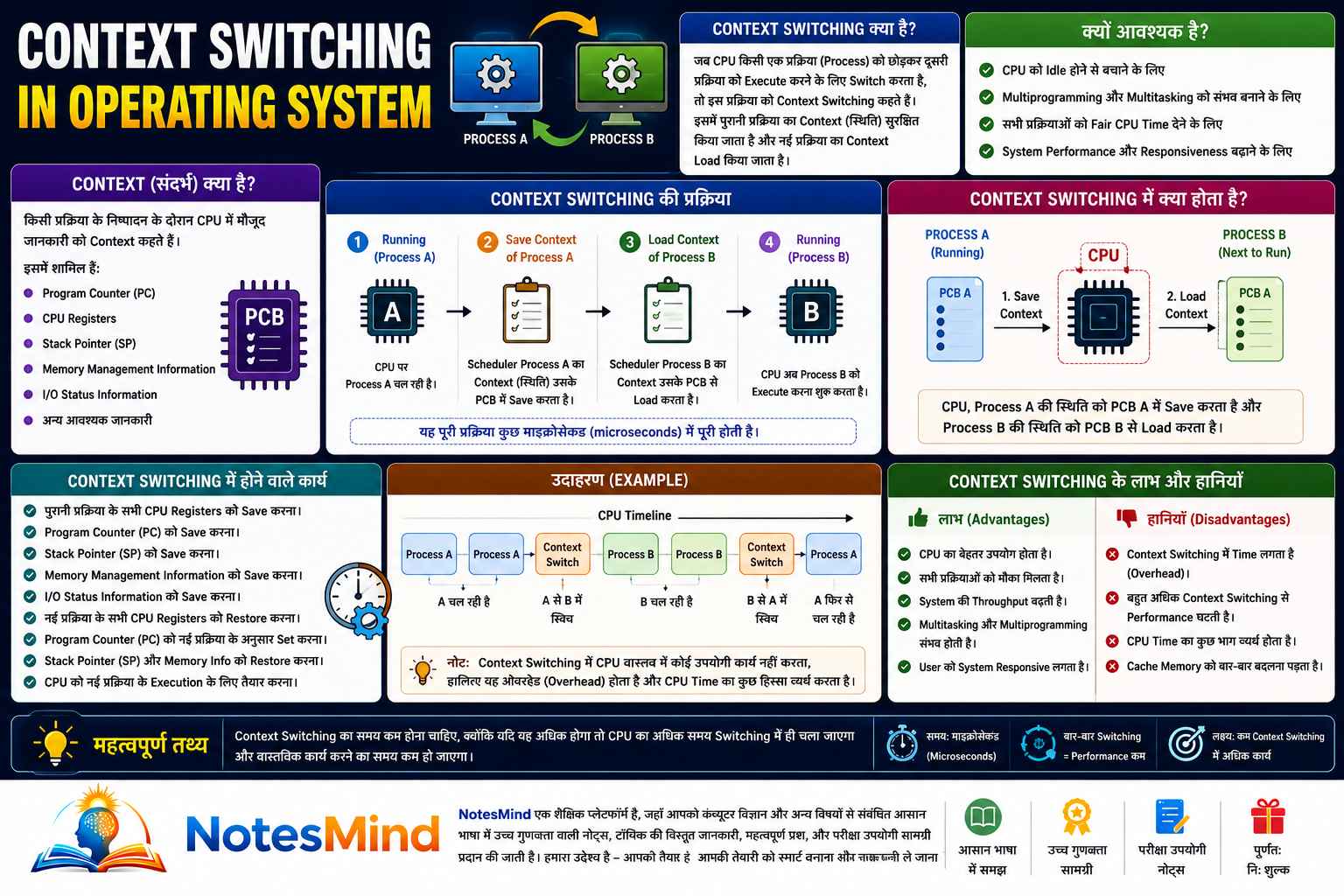
Context Switching क्या है? (What is Context Switching in OS Hindi)
Operating System की दुनिया में Context Switching एक बेहद ज़रूरी concept है — खासकर जब हम समझना चाहते हैं कि computer एक साथ कई programs कैसे handle करता है।
सीधे शब्दों में कहें तो: Context Switching वह process है जिसमें OS, CPU को एक running process से हटाकर दूसरी ready process को allocate करता है। Switch होने से पहले OS पहली process की पूरी state save करता है, और नई process की state restore करता है।
Formula: Context Switching = Save Current Process State + Load Next Process State
आसान भाषा में समझें — एक Real Example
मान लीजिए आप laptop पर Word में notes लिख रहे हैं। अचानक दोस्त बोलता है — "भाई, जल्दी email check कर।"
आप Word बंद नहीं करते। Computer चुपचाप Word की पूरी स्थिति save करता है, browser open करता है। Email देखने के बाद जब आप Word पर वापस आते हैं — cursor ठीक वहीं मिलता है जहाँ छोड़ा था।
यही है Context Switching।
Teacher वाला Example (और भी आसान)
एक teacher Class-10 को पढ़ा रहे हैं। Principal का बुलावा आता है। Teacher class छोड़कर जाते हैं, काम निपटाते हैं, और वापस आकर ठीक वहीं से पढ़ाना शुरू करते हैं जहाँ रुके थे। यह भी context switching का एकदम सटीक real-life example है।
Context क्या होता है?
Context यानी किसी process की पूरी current state। जब OS किसी process को CPU से हटाता है, तो उसे उस process की हर ज़रूरी जानकारी याद रखनी होती है — ताकि बाद में वहीं से शुरू किया जा सके।
इस state में ये सब शामिल होता है:
| Component | काम |
|---|---|
| Program Counter (PC) | अगली execute होने वाली instruction |
| CPU Registers | Calculation के बीच में रखे values |
| Stack Pointer (SP) | Current stack की position |
| Process State | Running / Waiting / Ready |
| Process ID (PID) | Process की unique पहचान |
| Memory Information | कौन सा memory space use हो रहा है |
| Open Files & I/O Status | कौन सी files और devices active हैं |
Context Save कहाँ होता है? — PCB (Process Control Block)
हर process का context Process Control Block (PCB) में save होता है। PCB basically एक data structure है जो OS maintain करता है।
Running Process
      │
      ▼
Save Context → PCB
      │
      ▼
Load Next Process
      │
      ▼
CPU
CPU Scheduling in OS के दौरान यही PCB सबसे critical role निभाता है।
Context Switching Step-by-Step कैसे होती है?
मान लीजिए तीन processes हैं — P1, P2, P3। शुरुआत में P1 CPU पर run हो रही है।
पूरा Flow:
Step 1 — P1 Execute हो रही है
CPU → P1 Running
Step 2 — Interrupt या Time Quantum खत्म
OS को signal मिलता है कि अब switch करना है।
Step 3 — P1 का Context Save
Program Counter, Registers, Stack — सब PCB में जाता है।
Step 4 — Scheduler अगली Process Select करता है
Ready Queue से P2 को choose किया जाता है।
Step 5 — P2 का Context Load
PCB से P2 की state restore होती है — CPU registers update होते हैं।
Step 6 — P2 Execute शुरू
CPU → P2 Running ✅
Running Process (P1)
         │
Time Quantum / Interrupt
         │
         ▼
Save Context → PCB
         │
         ▼
CPU Scheduler selects P2
         │
         ▼
Load Context of P2 from PCB
         │
         ▼
Running Process (P2)
Context Switching कब होती है? — 5 मुख्य Situations
1. Time Quantum Expire हो जाए
Round Robin Scheduling में हर process को एक fixed time मिलता है। वो खत्म हुआ — switch हो जाएगा।
2. Interrupt आए
Keyboard press, mouse click, disk read, network packet — कोई भी hardware interrupt context switch trigger कर सकता है।
3. I/O Request हो
जब कोई process input/output का इंतज़ार करती है, CPU उसे hold पर रखकर दूसरी process को दे देता है।
4. Higher Priority Process Ready हो जाए
Priority Scheduling में अगर कोई high-priority process ready queue में आ गई, तो current process को रोककर उसे CPU मिलेगा।
5. Process Terminate हो जाए
Process खत्म होते ही CPU free होता है और scheduler अगली process को भेजता है।
Context Switching का Cost — Overhead क्यों होता है?
Context Switching के दौरान CPU कोई useful काम नहीं करता — वो सिर्फ process बदलने में लगा रहता है। इसीलिए इसे Context Switching Overhead कहते हैं।
इसमें time लगता है क्योंकि:
- Registers save और restore होते हैं
- PCB update होता है
- Cache flush हो सकती है (नई process का data cache में नहीं होता)
- TLB (Translation Lookaside Buffer) refresh हो सकता है
सीधी बात: Context Switching जितनी कम होगी, Multitasking in Operating System उतनी efficient होगी।
Advantages और Disadvantages
Advantages ✅
| फायदा | क्यों? |
|---|---|
| CPU Utilization बढ़ती है | CPU idle नहीं रहता |
| Multitasking possible होती है | कई programs एक साथ चल सकते हैं |
| Fair CPU Sharing | हर process को बारी मिलती है |
| Better Responsiveness | User को delay कम लगता है |
| Interactive Systems तेज़ | Real-time feel आता है |
Disadvantages ❌
- Extra Overhead — हर switch पर time waste
- Cache Miss — नई process का data cache में नहीं होता
- CPU Time Waste — switch के दौरान कोई computation नहीं
- Performance Impact — बहुत ज़्यादा switching से system slow हो सकता है
FAQ — Context Switching के बारे में Common Questions
Q1. Context Switching और Thread Switching में क्या फर्क है?
Context Switching पूरी process की state save/restore करती है, जबकि Thread Switching same process के दो threads के बीच होती है। Thread Switching में memory space share होती है, इसलिए यह Context Switching से faster होती है और overhead कम होता है।
Q2. Context Switching को कैसे कम किया जा सकता है?
Time Quantum की value सही रखकर, threads का use करके (processes की जगह), और efficient scheduling algorithms (जैसे Shortest Job First) use करके context switching को minimize किया जा सकता है।
Q3. PCB और Context Switching का क्या connection है?
PCB (Process Control Block) वो जगह है जहाँ process का पूरा context store होता है। Context Switching के दौरान current process का context PCB में save होता है और next process का context PCB से load होता है। PCB के बिना context switching possible ही नहीं है।
💬 Leave a Comment & Rating