विज्ञापन / Advertisement
MS Office क्या है?
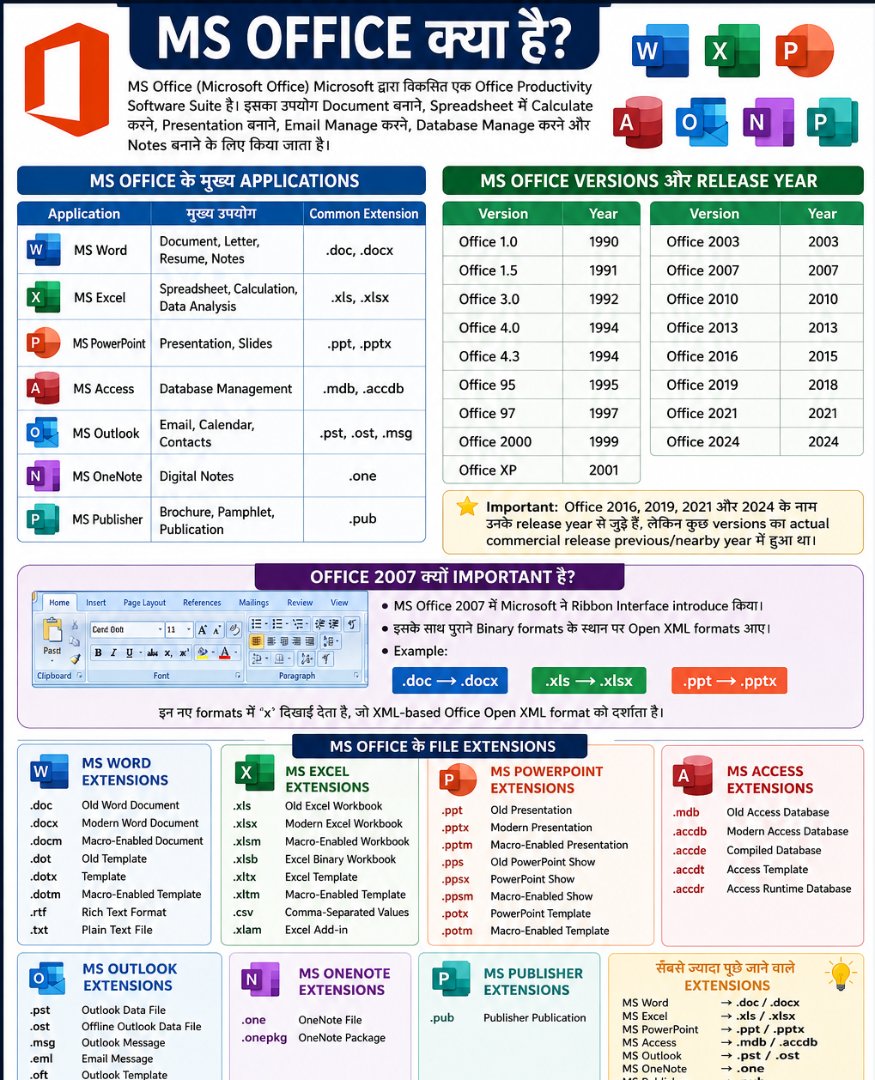
MS Office (Microsoft Office) Microsoft द्वारा developed एक Office Productivity Software Suite है। इसका उपयोग Document Creation, Spreadsheet, Data Analysis, Presentation, Database Management, Email Management और Note Taking जैसे कार्यों के लिए किया जाता है।
MS Office में अलग-अलग कामों के लिए अलग-अलग applications उपलब्ध हैं, जैसे MS Word, MS Excel, MS PowerPoint, MS Access, MS Outlook और OneNote।
MS Office के प्रमुख Applications
| Application | मुख्य कार्य | प्रमुख Extension |
|---|---|---|
| MS Word | Document बनाना और Formatting | .doc, .docx |
| MS Excel | Calculation और Data Analysis | .xls, .xlsx |
| MS PowerPoint | Presentation बनाना | .ppt, .pptx |
| MS Access | Database Management | .mdb, .accdb |
| MS Outlook | Email और Calendar | .pst, .ost |
| MS OneNote | Digital Notes | .one |
| MS Publisher | Publication और Designing | .pub |
MS Office का इतिहास और Versions
Microsoft Office का पहला major release 1990 में आया था। इसके बाद Microsoft ने समय-समय पर Office के नए versions जारी किए।
MS Office Versions और Release Year
| MS Office Version | Release Year |
|---|---|
| Office 1.0 | 1990 |
| Office 1.5 | 1991 |
| Office 3.0 | 1992 |
| Office 4.0 | 1994 |
| Office 4.3 | 1994 |
| Office 95 | 1995 |
| Office 97 | 1997 |
| Office 2000 | 1999 |
| Office XP | 2001 |
| Office 2003 | 2003 |
| Office 2007 | 2007 |
| Office 2010 | 2010 |
| Office 2013 | 2013 |
| Office 2016 | 2015 |
| Office 2019 | 2018 |
| Office 2021 | 2021 |
| Office 2024 | 2024 |
Exam Point: Office 2016 का commercial release 2015 में हुआ था, जबकि इसका नाम Office 2016 है। इसी तरह Office 2019 का release 2018 में हुआ था।
MS Office 2007 क्यों महत्वपूर्ण है?
MS Office 2007 MS Office के इतिहास में एक महत्वपूर्ण version था। इसमें Microsoft ने Ribbon Interface को introduce किया।
इसके साथ Office Open XML आधारित नए file formats भी आए।
उदाहरण:
Old Word       → .doc
Modern Word    → .docx

Old Excel      → .xls
Modern Excel   → .xlsx

Old PowerPoint → .ppt
Modern PowerPoint → .pptx
Ribbon Interface क्या है?
Ribbon MS Office का graphical interface है जिसमें commands को अलग-अलग Tabs और Groups में organize किया जाता है।
जैसे:
- Home
- Insert
- Page Layout
- References
- Mailings
- Review
- View
MS Word क्या है?
MS Word एक Word Processing Software है। इसका उपयोग text-based documents बनाने, edit करने और format करने के लिए किया जाता है।
MS Word के उपयोग
- Letter बनाना
- Resume बनाना
- Application लिखना
- Report तैयार करना
- Notes बनाना
- Table बनाना
- Page Formatting
- Mail Merge
- Printing
MS Word Extensions
| Extension | उपयोग |
|---|---|
.doc |
Old Word Document |
.docx |
Modern Word Document |
.docm |
Macro-Enabled Word Document |
.dot |
Old Word Template |
.dotx |
Word Template |
.dotm |
Macro-Enabled Template |
.rtf |
Rich Text Format |
.txt |
Plain Text |
Exam Point
MS Word की default modern file extension → .docx
MS Excel क्या है?
MS Excel एक Spreadsheet Software है जिसका उपयोग numerical calculations, data management और data analysis के लिए किया जाता है।
MS Excel के प्रमुख उपयोग
- Calculation
- Formula
- Functions
- Data Entry
- Data Analysis
- Charts
- Sorting
- Filtering
- PivotTable
- Reports
MS Excel Extensions
| Extension | उपयोग |
|---|---|
.xls |
Old Excel Workbook |
.xlsx |
Modern Excel Workbook |
.xlsm |
Macro-Enabled Workbook |
.xlsb |
Excel Binary Workbook |
.xltx |
Excel Template |
.xltm |
Macro-Enabled Template |
.csv |
Comma-Separated Values |
.xlam |
Excel Add-in |
Exam Point
MS Excel की modern default extension → .xlsx
MS PowerPoint क्या है?
MS PowerPoint एक Presentation Software है। इसका उपयोग slides के माध्यम से information present करने के लिए किया जाता है।
PowerPoint के उपयोग
- Educational Presentation
- Business Presentation
- Seminar
- Project Presentation
- Charts
- Images
- Animation
- Slide Transition
PowerPoint Extensions
| Extension | उपयोग |
|---|---|
.ppt |
Old Presentation |
.pptx |
Modern Presentation |
.pptm |
Macro-Enabled Presentation |
.pps |
Old PowerPoint Show |
.ppsx |
PowerPoint Show |
.ppsm |
Macro-Enabled Show |
.potx |
Presentation Template |
.potm |
Macro-Enabled Template |
Exam Point
PowerPoint की modern presentation extension → .pptx
MS Access क्या है?
MS Access Microsoft का एक Database Management System (DBMS) है। इसका उपयोग data को Tables, Queries, Forms और Reports के रूप में manage करने के लिए किया जाता है।
MS Access के मुख्य Components
- Table
- Query
- Form
- Report
MS Access Extensions
| Extension | उपयोग |
|---|---|
.mdb |
Old Access Database |
.accdb |
Modern Access Database |
.accde |
Compiled Access Database |
.accdt |
Access Template |
.accdr |
Access Runtime Database |
Exam Point
Modern MS Access Database → .accdb
MS Outlook क्या है?
MS Outlook एक Email and Personal Information Management Software है।
इसका उपयोग:
- Calendar
- Contacts
- Tasks
- Meetings
- Scheduling
के लिए किया जाता है।
MS Outlook Extensions
| Extension | उपयोग |
|---|---|
.pst |
Outlook Data File |
.ost |
Offline Outlook Data File |
.msg |
Outlook Message |
.eml |
Email Message |
.oft |
Outlook Template |
Important
PST = Personal Storage Table
OST = Offline Storage Table
MS OneNote क्या है?
MS OneNote एक Digital Note-Taking Application है। इसमें user text, images, drawings और अन्य information को notes के रूप में organize कर सकता है।
Extensions
.one→ OneNote file.onepkg→ OneNote Package
MS Publisher क्या है?
MS Publisher एक Desktop Publishing Software है।
इसका उपयोग:
- Brochure
- Flyer
- Poster
- Newsletter
- Business Card
- Invitation
जैसी publications बनाने के लिए किया जाता है।
Extension
.pub → Microsoft Publisher file
MS Office File Extensions की Complete List
Exam preparation के लिए सबसे important extensions को एक साथ देखें:
| Software | Old Extension | Modern/Common Extension |
|---|---|---|
| Word | .doc |
.docx |
| Excel | .xls |
.xlsx |
| PowerPoint | .ppt |
.pptx |
| Access | .mdb |
.accdb |
| Outlook | — | .pst, .ost |
| OneNote | — | .one |
| Publisher | — | .pub |
MS Office के Important Exam Points
1. MS Office किस company का product है?
Microsoft
2. MS Word किस प्रकार का software है?
Word Processing Software
3. MS Excel किस प्रकार का software है?
Spreadsheet Software
4. MS PowerPoint किस प्रकार का software है?
Presentation Software
5. MS Access किस प्रकार का software है?
Database Management System (DBMS)
6. MS Word की modern extension क्या है?
.docx
7. MS Excel की modern extension क्या है?
.xlsx
8. PowerPoint की modern extension क्या है?
.pptx
9. Access की modern database extension क्या है?
.accdb
10. Office 2007 में कौन-सा important interface आया?
Ribbon Interface
.doc और .docx में Difference
.doc |
.docx |
|---|---|
| Old Word format | Modern Word format |
| Binary-based legacy format | Office Open XML format |
| Older Office versions में common | Office 2007+ में standard |
| File size comparatively बड़ा हो सकता है | Generally more efficient |
.xls और .xlsx में Difference
.xls |
.xlsx |
|---|---|
| Old Excel format | Modern Excel format |
| Legacy binary format | XML-based format |
| Older Excel versions | Excel 2007+ |
| Modern features comparatively limited | Modern Excel features support करता है |
.ppt और .pptx में Difference
.ppt |
.pptx |
|---|---|
| Old PowerPoint format | Modern format |
| Legacy format | XML-based format |
| Older Office versions | Office 2007+ |
| Modern features comparatively limited | Modern presentation features |
MS Office और Microsoft 365 में Difference
आज के समय में Microsoft 365 और traditional Microsoft Office को लेकर confusion होता है।
Microsoft Office के perpetual versions जैसे Office 2021 और Office 2024 एक बार purchase किए जाने वाले editions हो सकते हैं, जबकि Microsoft 365 subscription-based service है जिसमें Office applications के साथ cloud और collaboration features मिलते हैं।
MS Office के फायदे
1. Easy Document Creation
Word की मदद से professional documents आसानी से बनाए जा सकते हैं।
2. Data Analysis
Excel large amount of data को organize और analyze करने में useful है।
3. Professional Presentation
PowerPoint से attractive और professional presentations बनाई जा सकती हैं।
4. Database Management
Access छोटे और medium-level database applications के लिए उपयोगी है।
5. Email Management
Outlook email और calendar management के लिए useful है।
MS Office का उपयोग कहाँ किया जाता है?
MS Office का उपयोग लगभग हर प्रकार के office और educational environment में किया जाता है।
- Schools
- Colleges
- Government Offices
- Private Companies
- Banks
- Business Organizations
- Data Entry Jobs
- Accounting
- Project Management
- Education
- Administration
MS Office FAQ
1. MS Office क्या है?
MS Office Microsoft द्वारा developed एक productivity software suite है, जिसमें Word, Excel, PowerPoint, Access, Outlook और OneNote जैसे applications शामिल हैं।
2. MS Office का पहला version कब आया था?
Microsoft Office का पहला version 1990 में release हुआ था।
3. MS Word की file extension क्या है?
Modern MS Word document की extension .docx है। पुराने Word documents में .doc extension का उपयोग होता था।
4. MS Excel की default file extension क्या है?
Modern Excel Workbook की extension .xlsx है।
5. MS PowerPoint की file extension क्या है?
Modern PowerPoint presentation की extension .pptx है।
6. MS Access की modern extension क्या है?
Modern MS Access database की extension .accdb है।
7. MS Office 2007 क्यों महत्वपूर्ण है?
Office 2007 में Ribbon Interface और Office Open XML-based file formats को introduce किया गया, जैसे .docx, .xlsx और .pptx।
8. MS Word, Excel और PowerPoint में क्या अंतर है?
Word documents के लिए, Excel spreadsheet और calculations के लिए तथा PowerPoint presentations के लिए उपयोग किया जाता है।
9. .xlsx किसका extension है?
.xlsx MS Excel Workbook की modern file extension है।
10. .pptx किसका extension है?
.pptx MS PowerPoint Presentation की modern file extension है।
Quick Revision Chart
MS OFFICE
│
├── MS Word
│   └── .doc / .docx
│
├── MS Excel
│   └── .xls / .xlsx
│
├── MS PowerPoint
│   └── .ppt / .pptx
│
├── MS Access
│   └── .mdb / .accdb
│
├── MS Outlook
│   └── .pst / .ost
│
├── MS OneNote
│   └── .one
│
└── MS Publisher
    └── .pub
विज्ञापन / Advertisement
💬 Leave a Comment & Rating