What is an Index in SQL
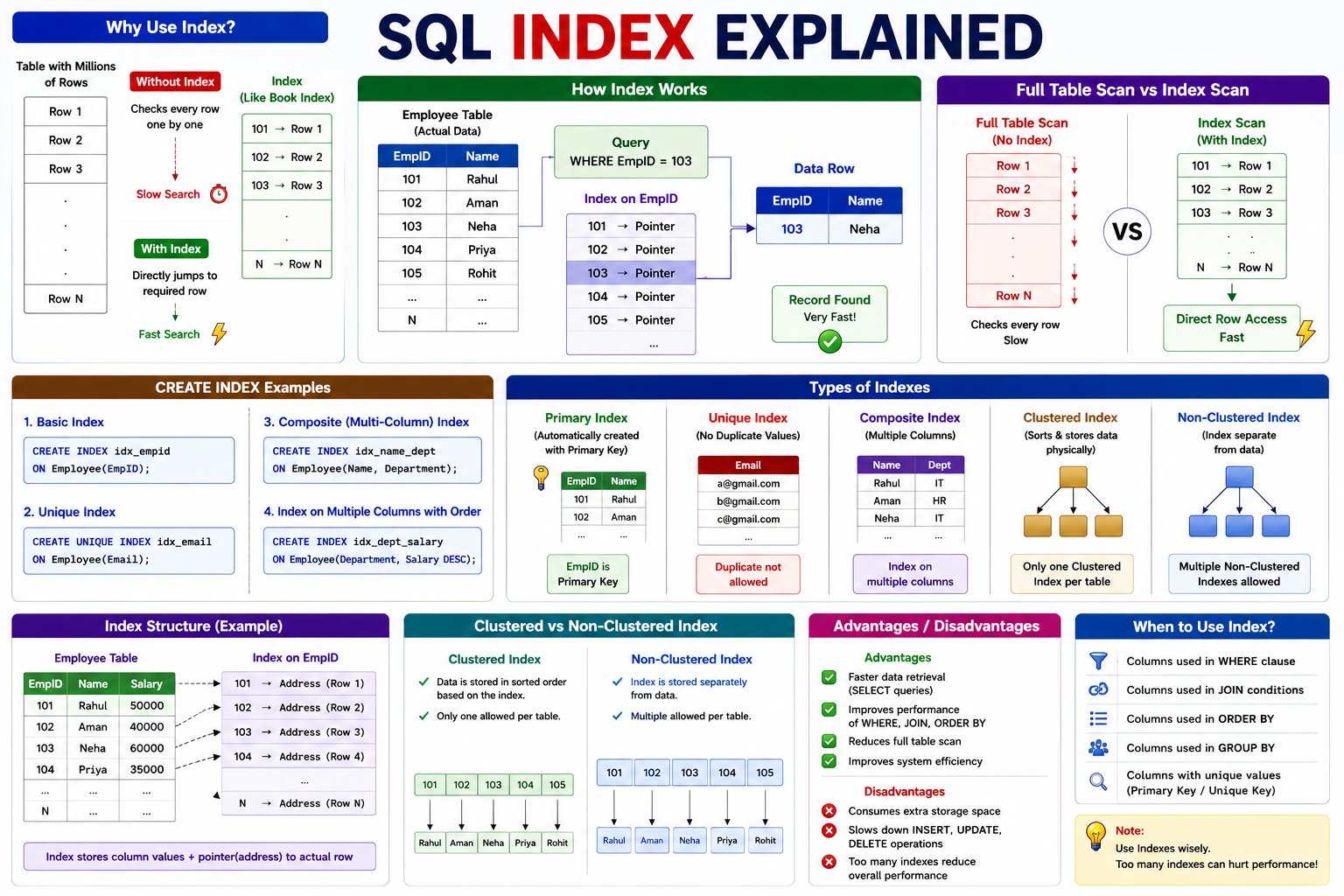
An Index is a special database object that improves the speed of data retrieval from a table.
Think of an index like the index page of a book. Instead of reading every page to find a topic, you look at the index, which tells you exactly where the information is located.
Similarly, SQL uses an Index to quickly locate rows without scanning the entire table.
Simple Definition
An Index is a database object that makes SELECT queries faster by reducing the amount of data SQL has to scan.
Hindi Explanation
Index Database का एक Special Object होता है जो Data Searching की Speed बढ़ाता है।
जैसे किसी Book के Index Page से हम किसी Topic को जल्दी ढूंढ लेते हैं, वैसे ही SQL Index किसी Record को जल्दी खोजने में मदद करता है।
Why Do We Need an Index?
Imagine a table containing 10 million employee records.
Without an Index:
Employee Table

Rahul
Aman
Neha
Rohit
...
10,000,000 Rows
SQL searches every row one by one.
This is called
Full Table Scan
Searching takes more time.
With an Index:
EmployeeID Index

101 → Row 1

102 → Row 2

103 → Row 3

104 → Row 4
SQL directly jumps to the required row.
Search becomes much faster.
Real-Life Example
Suppose you want to find:
EmployeeID = 100005
Without Index
Start

↓

Check Row 1

↓

Check Row 2

↓

Check Row 3

↓

...

↓

Row 100005
Time Required
Slow
With Index
Index

↓

EmployeeID =100005

↓

Direct Row Location

↓

Record Found
Time Required
Very Fast
How Index Works
                 Employee Table

101 Rahul

102 Aman

103 Neha

104 Priya

105 Rohit

        ▲

        │

      INDEX

        │

101 → Address

102 → Address

103 → Address

104 → Address
The Index stores:
- Indexed column value
- Pointer (address) to the actual row
It does not duplicate the entire row.
Syntax
Create Index
CREATE INDEX index_name
ON table_name(column_name);
Example
Employee Table
| EmployeeID | Name | Department |
|---|---|---|
| 101 | Rahul | IT |
| 102 | Aman | HR |
| 103 | Neha | Sales |
Create Index
CREATE INDEX idx_employeeid
ON Employee(EmployeeID);
Index created successfully.
Using the Index
Query
SELECT *
FROM Employee
WHERE EmployeeID =101;
SQL automatically uses the Index (when appropriate) to find the record quickly.
Output
| EmployeeID | Name |
|---|---|
| 101 | Rahul |
Unique Index
A Unique Index does not allow duplicate values.
Example
CREATE UNIQUE INDEX idx_email
ON Employee(Email);
Now duplicate email addresses cannot be inserted.
Composite Index (Multi-Column Index)
An index can be created on multiple columns.
Example
CREATE INDEX idx_name_department
ON Employee(Name, Department);
Useful when queries frequently search by both Name and Department.
Drop Index
Delete an Index.
MySQL
DROP INDEX idx_employeeid
ON Employee;
SQL Server
DROP INDEX Employee.idx_employeeid;
Types of Indexes
1. Primary Index
Automatically created when a Primary Key is defined.
Example
CREATE TABLE Employee
(
EmployeeID INT PRIMARY KEY,
EmployeeName VARCHAR(50)
);
EmployeeID automatically gets an index.
2. Unique Index
Prevents duplicate values.
Example
CREATE UNIQUE INDEX idx_email
ON Employee(Email);
3. Composite Index
Uses multiple columns.
Example
CREATE INDEX idx_name_dept
ON Employee(Name, Department);
4. Clustered Index
- Sorts and stores table data physically.
- Only one Clustered Index is allowed per table.
- Common in SQL Server.
5. Non-Clustered Index
- Stores the index separately from the data.
- Multiple Non-Clustered Indexes can exist on one table.
💬 Leave a Comment & Rating