What is a View in SQL
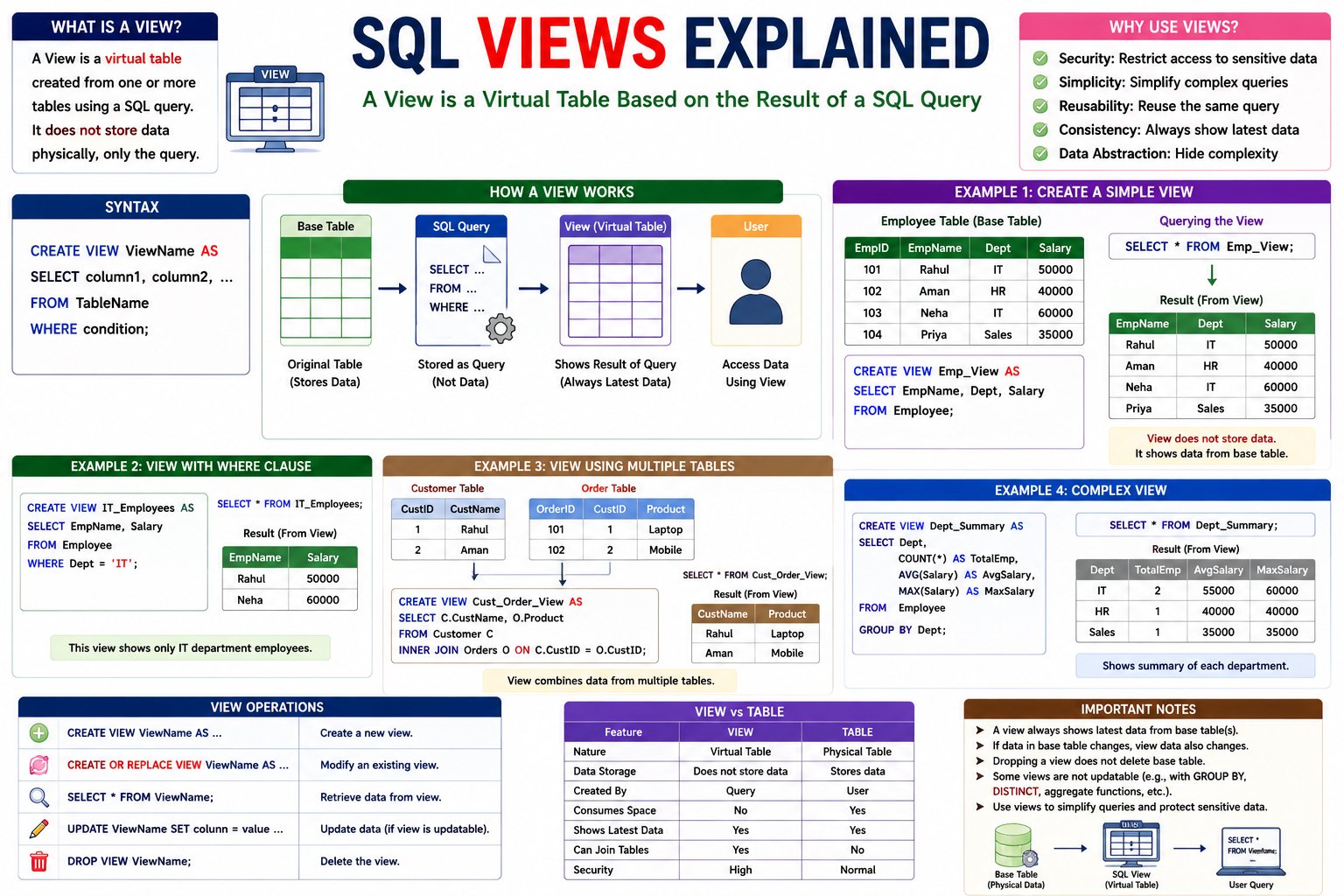
A View is a virtual table created from one or more existing database tables using a SQL query.
Unlike a real table, a View does not store data physically. It stores only the SQL query. Whenever you access the View, SQL fetches the latest data from the original table(s).
Simple Definition
A View is a virtual table that displays data from one or more tables.
Hindi Explanation
View एक Virtual Table होती है। इसमें वास्तविक (Physical) Data Store नहीं होता। इसमें केवल SQL Query Store होती है। जब भी View को Access किया जाता है, यह Original Table से नया (Latest) Data दिखाती है।
Why Do We Need Views?
Suppose an Employee table contains confidential information.
Employee Table
| EmployeeID | EmployeeName | Department | Salary | Phone |
|---|---|---|---|---|
| 101 | Rahul | IT | 50000 | 9876543210 |
| 102 | Aman | HR | 40000 | 9876543211 |
| 103 | Neha | IT | 60000 | 9876543212 |
HR employees should not see the Salary and Phone columns.
Instead of creating another table, we create a View.
The View only displays:
- Employee Name
- Department
How a View Works
              Employee Table
                     │
         ┌───────────┴───────────┐
         │                       │
     SQL VIEW               SQL Query
         │                       │
         └───────────┬───────────┘
                     │
             Virtual Table
A View acts as a window to the original table.
Syntax
Create a View
CREATE VIEW ViewName AS
SELECT column1, column2
FROM TableName;
Example 1: Create a View
Employee Table
| EmployeeID | EmployeeName | Department | Salary |
|---|---|---|---|
| 101 | Rahul | IT | 50000 |
| 102 | Aman | HR | 40000 |
| 103 | Neha | IT | 60000 |
Create a View:
CREATE VIEW Employee_View AS
SELECT EmployeeName,
Department
FROM Employee;
Display the View
SELECT *
FROM Employee_View;
Output
| EmployeeName | Department |
|---|---|
| Rahul | IT |
| Aman | HR |
| Neha | IT |
Only selected columns are displayed.
Example 2: View with WHERE Clause
Create a View showing only IT employees.
CREATE VIEW IT_Employees AS
SELECT EmployeeName,
Salary
FROM Employee
WHERE Department='IT';
Display the View.
SELECT *
FROM IT_Employees;
Output
| Employee | Salary |
|---|---|
| Rahul | 50000 |
| Neha | 60000 |
Example 3: View Using Multiple Tables
Customer Table
| CustomerID | CustomerName |
|---|---|
| 101 | Rahul |
| 102 | Aman |
Orders Table
| OrderID | CustomerID | Product |
|---|---|---|
| 1 | 101 | Laptop |
| 2 | 102 | Mobile |
Create a View.
CREATE VIEW Customer_Order_View AS
SELECT
Customer.CustomerName,
Orders.Product
FROM Customer
INNER JOIN Orders
ON Customer.CustomerID =
Orders.CustomerID;
Display the View.
SELECT *
FROM Customer_Order_View;
Output
| Customer | Product |
|---|---|
| Rahul | Laptop |
| Aman | Mobile |
Updating a View
Some Views are updatable.
UPDATE Employee_View
SET Department='Sales'
WHERE EmployeeName='Rahul';
The original table is updated automatically.
Note: Views that use
GROUP BY,DISTINCT, aggregate functions, or complex joins are often not updatable.
Replacing a View
Modify an existing View.
CREATE OR REPLACE VIEW Employee_View AS
SELECT
EmployeeName,
Department,
Salary
FROM Employee;
This replaces the old View with a new definition.
Dropping a View
Delete a View.
DROP VIEW Employee_View;
Only the View is deleted.
The original table remains unchanged.
View vs Table
| Feature | View | Table |
|---|---|---|
| Stores Data | ❌ No | ✅ Yes |
| Physical Storage | ❌ No | ✅ Yes |
| Created From | SQL Query | User Data |
| Can Join Tables | ✅ Yes | ❌ No |
| Shows Latest Data | ✅ Yes | ✅ Yes |
| Security | High | Normal |
💬 Leave a Comment & Rating