What is a SQL Join
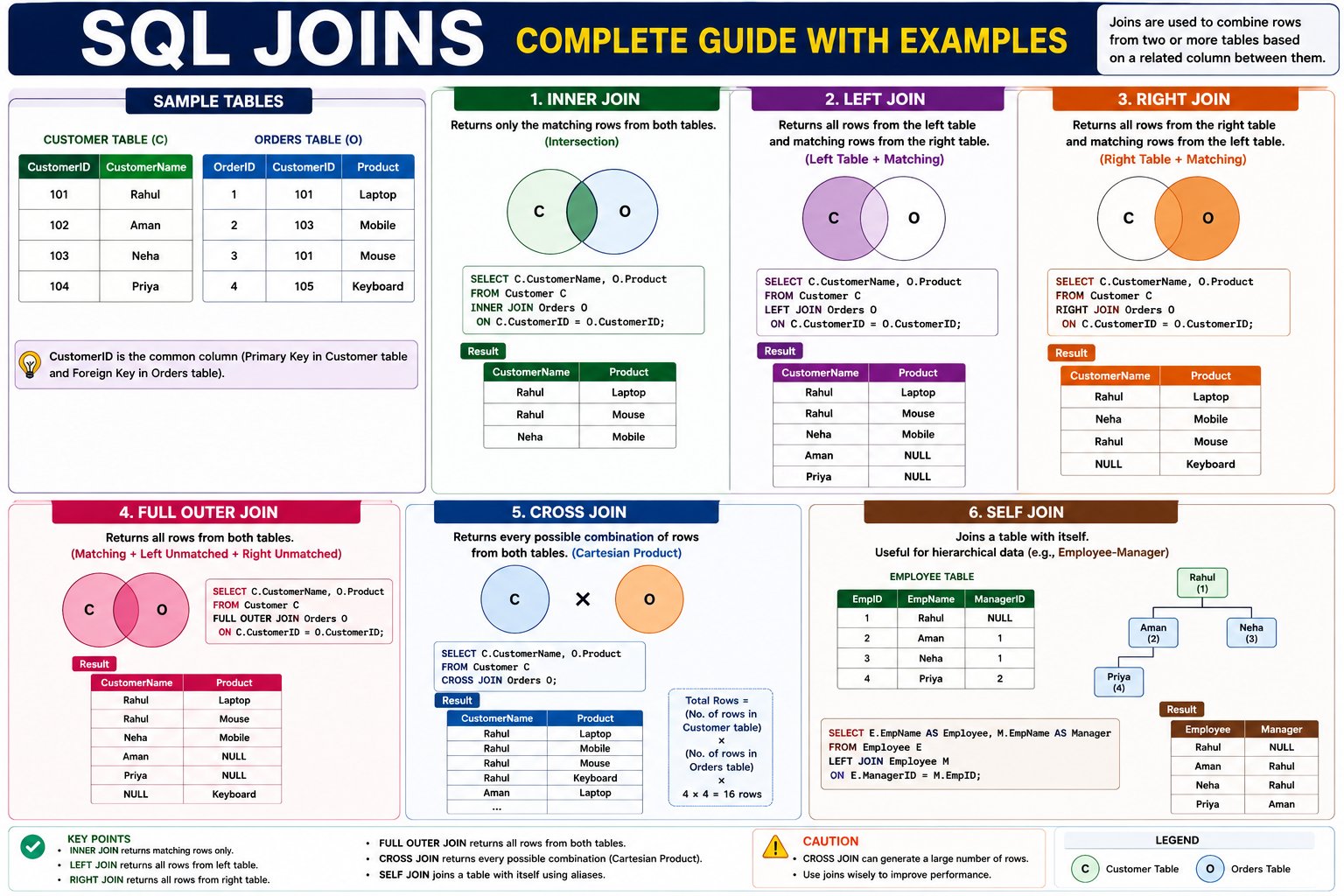
What is a SQL Join?
A SQL Join is used to combine data from two or more tables based on a related column. Joins allow you to retrieve meaningful information that is stored across multiple tables.
Simple Definition
A JOIN combines rows from multiple tables using a common column (usually a Primary Key and Foreign Key).
Hindi Explanation
SQL Join का उपयोग दो या दो से अधिक Tables को आपस में जोड़कर (Combine करके) डेटा प्राप्त करने के लिए किया जाता है। यह Common Column (जैसे Primary Key और Foreign Key) के आधार पर Tables को जोड़ता है।
Why Do We Need Joins?
In real-world databases, data is not stored in a single table.
For example, an online shopping system may have:
- Customers table → Customer information
- Orders table → Order details
- Products table → Product information
To see which customer placed which order, we need Joins.
Sample Tables
Customer Table
| CustomerID | CustomerName | City |
|---|---|---|
| 101 | Rahul | Delhi |
| 102 | Aman | Jaipur |
| 103 | Priya | Mumbai |
| 104 | Neha | Pune |
Orders Table
| OrderID | CustomerID | Product | Amount |
|---|---|---|---|
| 1 | 101 | Laptop | 55000 |
| 2 | 103 | Mobile | 25000 |
| 3 | 101 | Mouse | 800 |
| 4 | 105 | Keyboard | 1200 |
Notice that both tables contain the CustomerID column.
This common column is used to join the tables.
How SQL Join Works
Customer Table              Orders Table
-------------              -------------
CustomerID ◄──────────────► CustomerID
SQL matches rows where the values of CustomerID are the same.
Types of SQL Joins
| Join Type | Description |
|---|---|
| INNER JOIN | Returns only matching records |
| LEFT JOIN | Returns all rows from the left table and matching rows from the right table |
| RIGHT JOIN | Returns all rows from the right table and matching rows from the left table |
| FULL OUTER JOIN | Returns all rows from both tables |
| SELF JOIN | Joins a table with itself |
| CROSS JOIN | Returns every possible combination of rows |
SQL Join Flow
                    SQL JOINS
                        │
      ┌─────────────────┼──────────────────┐
      │                 │                  │
 INNER JOIN        LEFT JOIN        RIGHT JOIN
      │
      ├──────── FULL OUTER JOIN
      │
      ├──────── SELF JOIN
      │
      └──────── CROSS JOIN
Understanding with an Example
Suppose we want to display:
- Customer Name
- Product Purchased
- Order Amount
This information is stored in two different tables, so we need a JOIN.
SQL Join Syntax
SELECT column1, column2
FROM Table1
JOIN Table2
ON Table1.CommonColumn = Table2.CommonColumn;
Primary Key and Foreign Key
Before learning Joins, you must understand these two concepts.
Primary Key
A Primary Key uniquely identifies each row in a table.
Example:
| CustomerID | CustomerName |
|---|---|
| 101 | Rahul |
| 102 | Aman |
Here, CustomerID is the Primary Key.
Foreign Key
A Foreign Key is a column that refers to the Primary Key of another table.
Example:
Orders Table
| OrderID | CustomerID |
|---|---|
| 1 | 101 |
| 2 | 103 |
Here, CustomerID is a Foreign Key because it references the Customer table.
Real-World Applications of SQL Joins
SQL Joins are widely used in almost every database-driven application.
Banking System
- Customers + Accounts
- Accounts + Transactions
E-Commerce
- Customers + Orders
- Orders + Products
- Products + Categories
Hospital Management
- Patients + Doctors
- Doctors + Appointments
- Patients + Medical Records
School Management
- Students + Courses
- Students + Marks
- Teachers + Classes
Employee Management
- Employees + Departments
- Employees + Salaries
- Employees + Projects
Advantages of SQL Joins
- Retrieve data from multiple tables.
- Reduce data duplication through normalization.
- Generate meaningful reports.
- Maintain relationships between tables.
- Improve database organization.
Common Mistakes
Joining Without a Condition
SELECT *
FROM Customer, Orders;
This creates a Cartesian Product, producing every possible combination of rows, which is usually not what you want.
Correct Way
SELECT *
FROM Customer
INNER JOIN Orders
ON Customer.CustomerID = Orders.CustomerID;
What is INNER JOIN?
INNER JOIN returns only the matching records from two or more tables based on a common column.
If a row doesn't have a matching value in both tables, it is not included in the result.
Simple Definition
INNER JOIN returns only the rows that match in both tables.
Hindi Explanation
INNER JOIN केवल उन्हीं Records को दिखाता है जिनकी Matching Value दोनों Tables में मौजूद होती है।
यदि किसी Record की Matching Value दूसरी Table में नहीं है, तो वह Result में नहीं दिखाई देती।
Why Do We Use INNER JOIN?
Suppose a company stores customer details in one table and order details in another.
Customer Table
| CustomerID | CustomerName | City |
|---|---|---|
| 101 | Rahul | Delhi |
| 102 | Aman | Jaipur |
| 103 | Neha | Mumbai |
| 104 | Priya | Pune |
Orders Table
| OrderID | CustomerID | Product | Amount |
|---|---|---|---|
| 1 | 101 | Laptop | 55000 |
| 2 | 103 | Mobile | 25000 |
| 3 | 101 | Mouse | 800 |
| 4 | 105 | Keyboard | 1200 |
Notice:
- Customer 101 exists in both tables.
- Customer 103 exists in both tables.
- Customer 102 has no order.
- Customer 104 has no order.
- Customer 105 exists only in the Orders table.
How INNER JOIN Works
Customer Table                 Orders Table

101 Rahul      ─────────────►   101 Laptop ✔
102 Aman       ─────────────►   No Match ✘
103 Neha       ─────────────►   103 Mobile ✔
104 Priya      ─────────────►   No Match ✘
                              105 Keyboard ✘
Final Result
Only 101 and 103 are returned because they exist in both tables.
Syntax
SELECT columns
FROM Table1
INNER JOIN Table2
ON Table1.CommonColumn = Table2.CommonColumn;
Example 1: Display Customer Orders
SELECT Customer.CustomerName,
Orders.Product,
Orders.Amount
FROM Customer
INNER JOIN Orders
ON Customer.CustomerID = Orders.CustomerID;
Output
| CustomerName | Product | Amount |
|---|---|---|
| Rahul | Laptop | 55000 |
| Rahul | Mouse | 800 |
| Neha | Mobile | 25000 |
Step-by-Step Execution
Step 1
Read Customer Table
| ID | Name |
|---|---|
| 101 | Rahul |
| 102 | Aman |
| 103 | Neha |
| 104 | Priya |
Step 2
Read Orders Table
| Order | CustomerID |
|---|---|
| 1 | 101 |
| 2 | 103 |
| 3 | 101 |
| 4 | 105 |
Step 3
SQL compares CustomerID.
101 = 101 ✔

103 = 103 ✔

102 = No Match ✘

104 = No Match ✘

105 = No Match ✘
Step 4
Return only matching rows.
Visual Diagram
Customer Table        Orders Table

101 Rahul      ◄────────► 101 Laptop

103 Neha       ◄────────► 103 Mobile

102 Aman       No Match

104 Priya      No Match

105 Keyboard   No Match
Real-World Example
Online Shopping Website
Customers Table
| ID | Name |
|---|---|
| 101 | Rahul |
| 102 | Aman |
Orders Table
| OrderID | CustomerID | Product |
|---|---|---|
| 1 | 101 | Laptop |
| 2 | 101 | Mouse |
Query
SELECT Name,
Product
FROM Customers
INNER JOIN Orders
ON Customers.ID=Orders.CustomerID;
Output
| Name | Product |
|---|---|
| Rahul | Laptop |
| Rahul | Mouse |
Aman is not displayed because he has no orders.
Another Example
Employee Table
| EmployeeID | EmployeeName | DepartmentID |
|---|---|---|
| 1 | John | 10 |
| 2 | Alice | 20 |
| 3 | David | 30 |
Department Table
| DepartmentID | DepartmentName |
|---|---|
| 10 | HR |
| 20 | IT |
Query
SELECT EmployeeName,
DepartmentName
FROM Employee
INNER JOIN Department
ON Employee.DepartmentID =
Department.DepartmentID;
Output
| Employee | Department |
|---|---|
| John | HR |
| Alice | IT |
David is not shown because DepartmentID 30 doesn't exist in the Department table.
INNER JOIN vs Simple SELECT
Without JOIN
Customer Table

Rahul

Aman

Neha
With INNER JOIN
Rahul Laptop

Rahul Mouse

Neha Mobile
JOIN combines related information from different tables into one result.
Advantages
- Returns only relevant data.
- Eliminates unmatched records.
- Most commonly used SQL JOIN.
- Generates meaningful reports.
- Efficient for relational databases.
Disadvantages
- Unmatched records are excluded.
- Missing related data may not appear.
- Requires a correct relationship between tables.
Common Mistakes
Missing ON Clause
❌ Wrong
SELECT *
FROM Customer
INNER JOIN Orders;
This produces an error because SQL doesn't know how to match the tables.
Correct
SELECT *
FROM Customer
INNER JOIN Orders
ON Customer.CustomerID=
Orders.CustomerID;
Best Practices
- Always join tables using Primary Key and Foreign Key.
- Select only required columns instead of
SELECT *. - Use table aliases for long queries.
Example:
SELECT c.CustomerName,
o.Product
FROM Customer c
INNER JOIN Orders o
ON c.CustomerID=o.CustomerID;
What is LEFT JOIN?
LEFT JOIN returns:
- All records from the Left Table
- Matching records from the Right Table
If no matching record exists in the right table, SQL returns NULL values for the right table columns.
Simple Definition
LEFT JOIN returns all rows from the left table, even if there is no match in the right table.
Hindi Explanation
LEFT JOIN में Left Table के सभी Records दिखाई देते हैं। यदि Right Table में Matching Record नहीं मिलता, तो उसकी जगह NULL दिखाया जाता है।
Why Do We Use LEFT JOIN?
Suppose a company wants to see:
- All customers
- Whether they placed an order or not
INNER JOIN would hide customers without orders.
LEFT JOIN shows everyone.
Sample Tables
Customer Table
| CustomerID | CustomerName |
|---|---|
| 101 | Rahul |
| 102 | Aman |
| 103 | Neha |
| 104 | Priya |
Orders Table
| OrderID | CustomerID | Product |
|---|---|---|
| 1 | 101 | Laptop |
| 2 | 103 | Mobile |
| 3 | 101 | Mouse |
LEFT JOIN Syntax
SELECT columns
FROM Table1
LEFT JOIN Table2
ON Table1.column = Table2.column;
Example 1: Display All Customers and Their Orders
SELECT CustomerName,
Product
FROM Customer
LEFT JOIN Orders
ON Customer.CustomerID = Orders.CustomerID;
Output
| CustomerName | Product |
|---|---|
| Rahul | Laptop |
| Rahul | Mouse |
| Aman | NULL |
| Neha | Mobile |
| Priya | NULL |
How LEFT JOIN Works
LEFT TABLE (Customer)

Rahul  ─────► Laptop ✔
Aman   ─────► No Match → NULL
Neha   ─────► Mobile ✔
Priya  ─────► No Match → NULL
Notice:
- Aman appears even without an order.
- Priya appears even without an order.
This is the biggest difference from INNER JOIN.
INNER JOIN vs LEFT JOIN
INNER JOIN Result
| Customer |
|---|
| Rahul |
| Neha |
Only matching records.
LEFT JOIN Result
| Customer |
|---|
| Rahul |
| Aman |
| Neha |
| Priya |
All customers appear.
Real-World Example
Employee Table
| EmployeeID | EmployeeName | DepartmentID |
|---|---|---|
| 1 | John | 10 |
| 2 | Alice | 20 |
| 3 | David | 30 |
Department Table
| DepartmentID | DepartmentName |
|---|---|
| 10 | HR |
| 20 | IT |
Query:
SELECT EmployeeName,
DepartmentName
FROM Employee
LEFT JOIN Department
ON Employee.DepartmentID =
Department.DepartmentID;
Output:
| Employee | Department |
|---|---|
| John | HR |
| Alice | IT |
| David | NULL |
David is displayed because LEFT JOIN keeps all records from the Employee table.
Finding Records Without Matches
One common use of LEFT JOIN is finding missing records.
Example: Customers who never placed an order.
SELECT CustomerName
FROM Customer
LEFT JOIN Orders
ON Customer.CustomerID =
Orders.CustomerID
WHERE Orders.CustomerID IS NULL;
Output:
| CustomerName |
|---|
| Aman |
| Priya |
Very useful in interviews and real projects.
Visual Diagram
LEFT TABLE          RIGHT TABLE

Rahul      ◄──────► Laptop

Neha       ◄──────► Mobile

Aman       ◄──────► NULL

Priya      ◄──────► NULL
Advantages
- Returns all records from the left table.
- Helps identify missing relationships.
- Useful for reports and audits.
- Widely used in business applications.
Disadvantages
- Can return many NULL values.
- May produce larger result sets.
- Slightly slower than simple SELECT queries.
Common Mistakes
Wrong Join Condition
SELECT *
FROM Customer
LEFT JOIN Orders
ON Customer.Name = Orders.Product;
This joins unrelated columns and produces incorrect results.
Correct
SELECT *
FROM Customer
LEFT JOIN Orders
ON Customer.CustomerID =
Orders.CustomerID;
What is RIGHT JOIN?
RIGHT JOIN returns:
- All records from the Right Table
- Matching records from the Left Table
If there is no matching record in the left table, SQL returns NULL values for the left table columns.
Simple Definition
RIGHT JOIN returns every row from the right table, even if there is no matching row in the left table.
Hindi Explanation
RIGHT JOIN में Right Table के सभी Records हमेशा दिखाई देते हैं। यदि Left Table में Matching Record नहीं मिलता, तो Left Table के Columns में NULL दिखाई देता है।
Why Do We Use RIGHT JOIN?
Suppose a company wants to display:
- All orders
- Whether the customer information exists or not
Some orders may reference a customer that no longer exists. RIGHT JOIN ensures that all orders are still displayed.
Sample Tables
Customer Table
| CustomerID | CustomerName |
|---|---|
| 101 | Rahul |
| 102 | Aman |
| 103 | Neha |
| 104 | Priya |
Orders Table
| OrderID | CustomerID | Product |
|---|---|---|
| 1 | 101 | Laptop |
| 2 | 103 | Mobile |
| 3 | 101 | Mouse |
| 4 | 105 | Keyboard |
Notice:
- Customer 105 does not exist in the Customer table.
RIGHT JOIN Syntax
SELECT columns
FROM Customer
RIGHT JOIN Orders
ON Customer.CustomerID = Orders.CustomerID;
Example 1: Display All Orders
SELECT CustomerName,
Product
FROM Customer
RIGHT JOIN Orders
ON Customer.CustomerID = Orders.CustomerID;
Output
| CustomerName | Product |
|---|---|
| Rahul | Laptop |
| Neha | Mobile |
| Rahul | Mouse |
| NULL | Keyboard |
Step-by-Step Explanation
Step 1
Read the Orders table because it is the Right Table.
| Order | CustomerID |
|---|---|
| Laptop | 101 |
| Mobile | 103 |
| Mouse | 101 |
| Keyboard | 105 |
Step 2
Find matching customers.
101 → Rahul ✔

103 → Neha ✔

105 → No Match ✘
Step 3
Since RIGHT JOIN keeps all records from the right table, the Keyboard order is still displayed.
Result:
| Customer | Product |
|---|---|
| Rahul | Laptop |
| Neha | Mobile |
| Rahul | Mouse |
| NULL | Keyboard |
Visual Diagram
Customer Table           Orders Table

Rahul    ◄────────► Laptop ✔

Neha     ◄────────► Mobile ✔

Rahul    ◄────────► Mouse ✔

NULL     ◄────────► Keyboard ✔
The Keyboard order appears even though no matching customer exists.
INNER JOIN vs LEFT JOIN vs RIGHT JOIN
INNER JOIN
Only matching records.
| Customer | Product |
|---|---|
| Rahul | Laptop |
| Rahul | Mouse |
| Neha | Mobile |
LEFT JOIN
All customers.
| Customer | Product |
|---|---|
| Rahul | Laptop |
| Rahul | Mouse |
| Aman | NULL |
| Neha | Mobile |
| Priya | NULL |
RIGHT JOIN
All orders.
| Customer | Product |
|---|---|
| Rahul | Laptop |
| Rahul | Mouse |
| Neha | Mobile |
| NULL | Keyboard |
Real-World Example
Employee Table
| EmployeeID | EmployeeName |
|---|---|
| 1 | John |
| 2 | Alice |
Project Table
| ProjectID | EmployeeID | ProjectName |
|---|---|---|
| 101 | 1 | Website |
| 102 | 2 | Mobile App |
| 103 | 3 | AI System |
Employee 3 does not exist.
Query
SELECT EmployeeName,
ProjectName
FROM Employee
RIGHT JOIN Project
ON Employee.EmployeeID =
Project.EmployeeID;
Output
| Employee | Project |
|---|---|
| John | Website |
| Alice | Mobile App |
| NULL | AI System |
The AI System project is still shown because RIGHT JOIN keeps every row from the Project table.
Finding Missing Parent Records
RIGHT JOIN can help identify records in the right table that don't have a matching record in the left table.
SELECT Orders.OrderID,
Orders.Product
FROM Customer
RIGHT JOIN Orders
ON Customer.CustomerID =
Orders.CustomerID
WHERE Customer.CustomerID IS NULL;
Output
| OrderID | Product |
|---|---|
| 4 | Keyboard |
This query identifies orders that have no matching customer.
Advantages
- Returns every record from the right table.
- Useful for data validation and audits.
- Helps identify orphan records (records without a matching parent).
- Supports reporting when the right table contains the primary data.
Disadvantages
- Can produce many NULL values.
- Less commonly used than LEFT JOIN.
- Some developers rewrite RIGHT JOIN as LEFT JOIN by swapping table positions for readability.
Common Mistakes
Wrong Join Condition
SELECT *
FROM Customer
RIGHT JOIN Orders
ON Customer.CustomerName = Orders.Product;
This compares unrelated columns and produces incorrect results.
Correct
SELECT *
FROM Customer
RIGHT JOIN Orders
ON Customer.CustomerID =
Orders.CustomerID;
What is FULL OUTER JOIN?
FULL OUTER JOIN returns:
- All records from the Left Table
- All records from the Right Table
- Matching records are combined
- Non-matching records are filled with
NULL
It is basically a combination of LEFT JOIN + RIGHT JOIN.
Simple Definition
FULL OUTER JOIN returns every record from both tables, whether they match or not.
Hindi Explanation
FULL OUTER JOIN दोनों Tables के सभी Records दिखाता है। अगर कोई Record दूसरी Table में Match नहीं करता, तो उसकी जगह NULL दिखाया जाता है।
Why Do We Use FULL OUTER JOIN?
Suppose a company wants a report showing:
- Every customer
- Every order
- Even if a customer has no order
- Even if an order has no customer
This is exactly what FULL OUTER JOIN does.
Sample Tables
Customer Table
| CustomerID | CustomerName |
|---|---|
| 101 | Rahul |
| 102 | Aman |
| 103 | Neha |
| 104 | Priya |
Orders Table
| OrderID | CustomerID | Product |
|---|---|---|
| 1 | 101 | Laptop |
| 2 | 103 | Mobile |
| 3 | 101 | Mouse |
| 4 | 105 | Keyboard |
Notice:
- Customer 102 has no order.
- Customer 104 has no order.
- Order with CustomerID 105 has no matching customer.
FULL OUTER JOIN Syntax
Supported in: PostgreSQL, SQL Server, Oracle
SELECT columns
FROM Customer
FULL OUTER JOIN Orders
ON Customer.CustomerID = Orders.CustomerID;
MySQL Note: MySQL does not support
FULL OUTER JOINdirectly. You can achieve the same result by combining aLEFT JOINand aRIGHT JOINusingUNION.
SELECT Customer.CustomerID, CustomerName, Product
FROM Customer
LEFT JOIN Orders
ON Customer.CustomerID = Orders.CustomerID

UNION

SELECT Customer.CustomerID, CustomerName, Product
FROM Customer
RIGHT JOIN Orders
ON Customer.CustomerID = Orders.CustomerID;
Example 1: Display All Customers and All Orders
SELECT CustomerName,
Product
FROM Customer
FULL OUTER JOIN Orders
ON Customer.CustomerID = Orders.CustomerID;
Output
| CustomerName | Product |
|---|---|
| Rahul | Laptop |
| Rahul | Mouse |
| Neha | Mobile |
| Aman | NULL |
| Priya | NULL |
| NULL | Keyboard |
Step-by-Step Explanation
Step 1
Match common CustomerIDs.
101 → Rahul ↔ Laptop ✔

103 → Neha ↔ Mobile ✔
Step 2
Keep unmatched customers.
Aman → No Order → NULL

Priya → No Order → NULL
Step 3
Keep unmatched orders.
Keyboard → CustomerID 105

No Customer Found → NULL
Final Result
Every row from both tables is displayed.
Visual Diagram
Customer Table               Orders Table

Rahul      ◄────────────► Laptop ✔

Neha       ◄────────────► Mobile ✔

Aman       ◄────────────► NULL

Priya      ◄────────────► NULL

NULL       ◄────────────► Keyboard
Comparison of Joins
INNER JOIN
Only matching records.
| Customer | Product |
|---|---|
| Rahul | Laptop |
| Rahul | Mouse |
| Neha | Mobile |
LEFT JOIN
All customers.
| Customer | Product |
|---|---|
| Rahul | Laptop |
| Rahul | Mouse |
| Aman | NULL |
| Neha | Mobile |
| Priya | NULL |
RIGHT JOIN
All orders.
| Customer | Product |
|---|---|
| Rahul | Laptop |
| Rahul | Mouse |
| Neha | Mobile |
| NULL | Keyboard |
FULL OUTER JOIN
Everything from both tables.
| Customer | Product |
|---|---|
| Rahul | Laptop |
| Rahul | Mouse |
| Neha | Mobile |
| Aman | NULL |
| Priya | NULL |
| NULL | Keyboard |
Real-World Example
Employee Table
| EmployeeID | EmployeeName |
|---|---|
| 1 | John |
| 2 | Alice |
| 3 | David |
Project Table
| ProjectID | EmployeeID | Project |
|---|---|---|
| 101 | 1 | Website |
| 102 | 2 | Mobile App |
| 103 | 4 | AI System |
Employee David has no project, and the AI System project has no matching employee.
Query
SELECT EmployeeName,
Project
FROM Employee
FULL OUTER JOIN Project
ON Employee.EmployeeID =
Project.EmployeeID;
Output
| Employee | Project |
|---|---|
| John | Website |
| Alice | Mobile App |
| David | NULL |
| NULL | AI System |
Advantages
- Returns every record from both tables.
- Useful for data comparison and auditing.
- Helps identify missing or unmatched data.
- Excellent for reconciliation reports.
Disadvantages
- Produces many
NULLvalues when tables have many unmatched rows. - Can be slower on large datasets.
- Not directly supported in MySQL.
Common Mistakes
Using FULL OUTER JOIN in MySQL
SELECT *
FROM Customer
FULL OUTER JOIN Orders
ON Customer.CustomerID =
Orders.CustomerID;
This will fail in MySQL because the database does not support FULL OUTER JOIN.
MySQL Alternative
Use:
LEFT JOINUNIONRIGHT JOIN
What is SELF JOIN?
A SELF JOIN is a join where a table is joined with itself.
Although there is only one table, SQL treats it as two separate tables by using table aliases.
Simple Definition
SELF JOIN joins a table with itself to compare or relate rows within the same table.
Hindi Explanation
SELF JOIN में एक ही Table को खुद के साथ Join किया जाता है। SQL Table को अलग-अलग नाम (Aliases) देकर दो अलग Tables की तरह मानता है।
Why Do We Need SELF JOIN?
Some data naturally has a relationship within the same table.
Examples:
- Employee → Manager
- Student → Mentor
- Category → Parent Category
- Family Tree
- Organization Hierarchy
Instead of creating another table, we relate rows within the same table.
Example Table
Employee Table
| EmployeeID | EmployeeName | ManagerID |
|---|---|---|
| 1 | Rahul | NULL |
| 2 | Aman | 1 |
| 3 | Neha | 1 |
| 4 | Priya | 2 |
| 5 | Rohit | 2 |
Explanation
- Rahul is the CEO (no manager).
- Aman reports to Rahul.
- Neha reports to Rahul.
- Priya reports to Aman.
- Rohit reports to Aman.
Why Can't We Use a Normal JOIN?
There is only one Employee table.
We need to compare:
- EmployeeID
- ManagerID
Both columns are inside the same table.
That's why SELF JOIN is required.
How SELF JOIN Works
Employee Table

EmployeeID  ManagerID

1 -------- NULL

2 -------- 1

3 -------- 1

4 -------- 2

5 -------- 2
SQL creates two virtual copies.
Employee AS E

Employee AS M
Then matches:
E.ManagerID = M.EmployeeID
SELF JOIN Syntax
SELECT
E.EmployeeName AS Employee,
M.EmployeeName AS Manager
FROM Employee E
INNER JOIN Employee M
ON E.ManagerID = M.EmployeeID;
Understanding Table Aliases
Employee E
means
Employee Table → E
Similarly
Employee M
means
Employee Table → M
Both refer to the same table.
Example 1
Query
SELECT
E.EmployeeName AS Employee,
M.EmployeeName AS Manager
FROM Employee E
INNER JOIN Employee M
ON E.ManagerID = M.EmployeeID;
Output
| Employee | Manager |
|---|---|
| Aman | Rahul |
| Neha | Rahul |
| Priya | Aman |
| Rohit | Aman |
Step-by-Step Explanation
Employee Table
| ID | Employee | ManagerID |
|---|---|---|
| 1 | Rahul | NULL |
| 2 | Aman | 1 |
| 3 | Neha | 1 |
| 4 | Priya | 2 |
| 5 | Rohit | 2 |
SQL compares:
ManagerID = EmployeeID
Matching
2 → 1 ✔

3 → 1 ✔

4 → 2 ✔

5 → 2 ✔
Then returns
| Employee | Manager |
|---|---|
| Aman | Rahul |
| Neha | Rahul |
| Priya | Aman |
| Rohit | Aman |
Visual Diagram
Rahul
│
├── Aman
│     ├── Priya
│     └── Rohit
│
└── Neha
SELF JOIN creates this hierarchy.
Example 2
Student Mentor System
Student Table
| StudentID | StudentName | MentorID |
|---|---|---|
| 1 | Rahul | NULL |
| 2 | Aman | 1 |
| 3 | Priya | 1 |
| 4 | Rohit | 2 |
Query
SELECT
S.StudentName,
M.StudentName AS Mentor
FROM Student S
INNER JOIN Student M
ON S.MentorID=M.StudentID;
Output
| Student | Mentor |
|---|---|
| Aman | Rahul |
| Priya | Rahul |
| Rohit | Aman |
Example 3
Category Hierarchy
| CategoryID | CategoryName | ParentID |
|---|---|---|
| 1 | Electronics | NULL |
| 2 | Laptop | 1 |
| 3 | Mobile | 1 |
| 4 | Gaming Laptop | 2 |
SELF JOIN shows
| Category | Parent Category |
|---|---|
| Laptop | Electronics |
| Mobile | Electronics |
| Gaming Laptop | Laptop |
LEFT SELF JOIN
Sometimes the CEO has no manager.
Use LEFT JOIN.
SELECT
E.EmployeeName,
M.EmployeeName AS Manager
FROM Employee E
LEFT JOIN Employee M
ON E.ManagerID=M.EmployeeID;
Output
| Employee | Manager |
|---|---|
| Rahul | NULL |
| Aman | Rahul |
| Neha | Rahul |
| Priya | Aman |
| Rohit | Aman |
Now Rahul also appears.
Real-World Applications
Company
Employee → Manager
School
Student → Mentor
E-Commerce
Category → Parent Category
Hospital
Doctor → Senior Doctor
Organization Chart
CEO
↓
Manager
↓
Team Leader
↓
Employee
Advantages
- No need for an extra table.
- Represents hierarchical relationships.
- Easy to build organization charts.
- Useful for parent-child relationships.
Disadvantages
- Queries become harder to read.
- Aliases are mandatory.
- Multiple SELF JOINs can reduce performance.
Common Mistakes
Forgetting Aliases
❌ Wrong
SELECT EmployeeName
FROM Employee
INNER JOIN Employee
ON ManagerID=EmployeeID;
SQL cannot determine which instance of the table you mean.
Correct
SELECT
E.EmployeeName,
M.EmployeeName
FROM Employee E
INNER JOIN Employee M
ON E.ManagerID=M.EmployeeID;
What is CROSS JOIN?
A CROSS JOIN returns every possible combination of rows from two tables.
Unlike other joins, CROSS JOIN does not require a matching column or an ON condition.
This operation is also called a Cartesian Product.
Simple Definition
CROSS JOIN combines every row of the first table with every row of the second table.
Hindi Explanation
CROSS JOIN में पहली Table का हर Record दूसरी Table के हर Record के साथ Combine होता है। इसलिए Result में सभी Possible Combinations दिखाई देते हैं।
Why Do We Use CROSS JOIN?
Normally, SQL joins tables using a common column.
However, sometimes we need all possible combinations, such as:
- All products with all available colors
- All students with all subjects
- All T-shirt sizes with all colors
- All employees with all training sessions
In these cases, CROSS JOIN is the right choice.
Sample Tables
Product Table
| ProductID | Product |
|---|---|
| 1 | Laptop |
| 2 | Mobile |
Color Table
| ColorID | Color |
|---|---|
| 1 | Black |
| 2 | White |
| 3 | Silver |
CROSS JOIN Syntax
SELECT columns
FROM Table1
CROSS JOIN Table2;
Notice:
- No
ONclause - No matching condition
- Every row is combined with every other row
Example 1: Product and Color Combinations
SELECT Product,
Color
FROM Product
CROSS JOIN Color;
Output
| Product | Color |
|---|---|
| Laptop | Black |
| Laptop | White |
| Laptop | Silver |
| Mobile | Black |
| Mobile | White |
| Mobile | Silver |
How CROSS JOIN Works
Product Table
Laptop

Mobile
Color Table
Black

White

Silver
SQL creates every possible combination.
Laptop → Black

Laptop → White

Laptop → Silver

Mobile → Black

Mobile → White

Mobile → Silver
Formula
The total number of rows returned is:
Rows in Table A × Rows in Table B
Example
Product Table = 2 Rows
Color Table = 3 Rows
Result
2 × 3 = 6 Rows
Visual Diagram
Products               Colors

Laptop        ×        Black

Laptop        ×        White

Laptop        ×        Silver

Mobile        ×        Black

Mobile        ×        White

Mobile        ×        Silver
Every Product is paired with every Color.
Example 2: Students and Subjects
Student Table
| Student |
|---|
| Rahul |
| Aman |
Subject Table
| Subject |
|---|
| Math |
| Science |
| English |
Query
SELECT Student,
Subject
FROM Student
CROSS JOIN Subject;
Output
| Student | Subject |
|---|---|
| Rahul | Math |
| Rahul | Science |
| Rahul | English |
| Aman | Math |
| Aman | Science |
| Aman | English |
Example 3: T-Shirt Store
Size Table
| Size |
|---|
| S |
| M |
| L |
Color Table
| Color |
|---|
| Black |
| White |
Query
SELECT Size,
Color
FROM Size
CROSS JOIN Color;
Output
| Size | Color |
|---|---|
| S | Black |
| S | White |
| M | Black |
| M | White |
| L | Black |
| L | White |
💬 Leave a Comment & Rating