Aggregate Functions in SQL
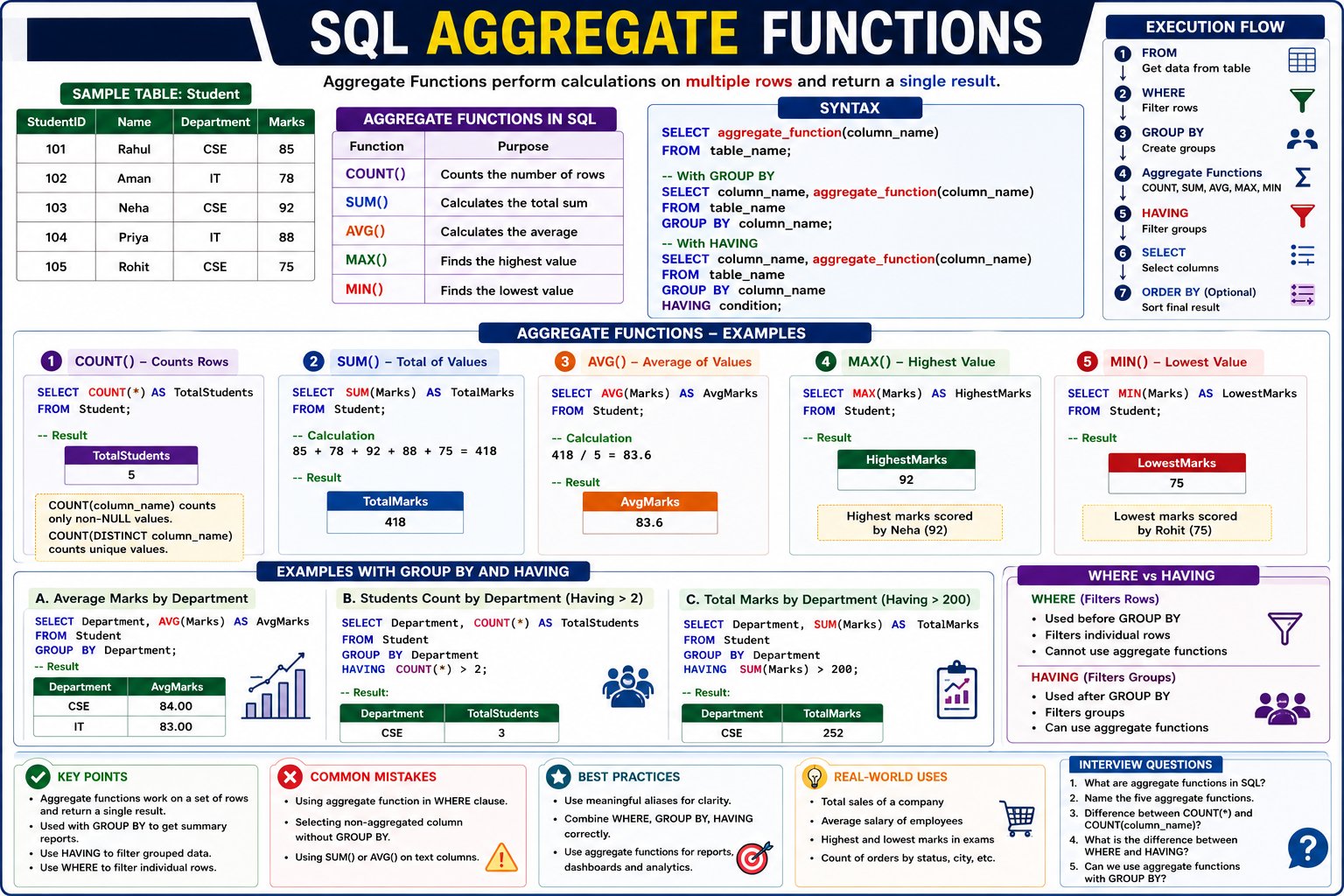
What are Aggregate Functions?
Aggregate Functions are built-in SQL functions that perform calculations on multiple rows and return a single result.
Instead of processing one row at a time, aggregate functions summarize a group of rows.
Simple Definition
Aggregate Functions calculate a summary value from multiple records.
Hindi Explanation
Aggregate Functions ऐसे SQL Functions हैं जो कई Rows पर Calculation करके एक Single Result Return करते हैं।
Example:
Suppose there are 100 students.
Instead of displaying all students, SQL can answer:
- Total Students
- Average Marks
- Highest Marks
- Lowest Marks
- Total Marks
using Aggregate Functions.
Why Do We Need Aggregate Functions?
Imagine this table.
Student Table
| StudentID | Name | Department | Marks |
|---|---|---|---|
| 101 | Rahul | CSE | 85 |
| 102 | Aman | IT | 78 |
| 103 | Neha | CSE | 92 |
| 104 | Priya | IT | 88 |
| 105 | Rohit | CSE | 75 |
If the principal asks:
- How many students are there?
- What is the average marks?
- Who scored the highest marks?
- What is the total marks of all students?
Instead of calculating manually, SQL does it automatically using Aggregate Functions.
Types of Aggregate Functions
SQL provides five main aggregate functions.
| Function | Purpose |
|---|---|
COUNT() |
Counts records |
SUM() |
Adds values |
AVG() |
Calculates average |
MAX() |
Finds the highest value |
MIN() |
Finds the lowest value |
1. COUNT()
Purpose
Counts the number of rows.
Syntax
SELECT COUNT(*)
FROM Student;
Example
SELECT COUNT(*) AS TotalStudents
FROM Student;
Output
| TotalStudents |
|---|
| 5 |
Explanation
SQL counts every row in the Student table.
COUNT(ColumnName)
SELECT COUNT(Department)
FROM Student;
Counts only rows where Department is NOT NULL.
COUNT(DISTINCT)
SELECT COUNT(DISTINCT Department)
FROM Student;
Output
| Departments |
|---|
| 2 |
Only CSE and IT are counted once.
2. SUM()
Purpose
Adds all numeric values.
Syntax
SELECT SUM(column_name)
FROM table_name;
Example
SELECT SUM(Marks)
FROM Student;
Calculation
85 + 78 + 92 + 88 + 75 = 418
Output
| TotalMarks |
|---|
| 418 |
3. AVG()
Purpose
Calculates the average.
Syntax
SELECT AVG(Marks)
FROM Student;
Calculation
418 ÷ 5

= 83.6
Output
| AverageMarks |
|---|
| 83.6 |
4. MAX()
Purpose
Returns the highest value.
Example
SELECT MAX(Marks)
FROM Student;
Output
| HighestMarks |
|---|
| 92 |
Highest marks belong to Neha.
5. MIN()
Purpose
Returns the smallest value.
SELECT MIN(Marks)
FROM Student;
Output
| LowestMarks |
|---|
| 75 |
Lowest marks belong to Rohit.
Aggregate Functions with GROUP BY
Aggregate functions become even more useful when combined with GROUP BY.
Example
SELECT Department,
AVG(Marks) AS AverageMarks
FROM Student
GROUP BY Department;
Output
| Department | AverageMarks |
|---|---|
| CSE | 84 |
| IT | 83 |
SQL first creates groups based on Department, then calculates the average marks for each group.
Aggregate Functions with HAVING
SELECT Department,
COUNT(*) AS TotalStudents
FROM Student
GROUP BY Department
HAVING COUNT(*) > 2;
Output
| Department | TotalStudents |
|---|---|
| CSE | 3 |
HAVING filters the grouped results.
Aggregate Functions with WHERE
SELECT AVG(Marks)
FROM Student
WHERE Department='CSE';
Output
| AverageMarks |
|---|
| 84 |
WHERE filters rows before the average is calculated.
Execution Flow
Student Table
      │
      ▼
WHERE
(Filter Rows)
      │
      ▼
GROUP BY
(Create Groups)
      │
      ▼
Aggregate Function
(COUNT, SUM, AVG...)
      │
      ▼
HAVING
(Filter Groups)
      │
      ▼
Final Output
Real-World Example
Suppose an online shopping company has the following table.
Orders
| OrderID | City | Amount |
|---|---|---|
| 1 | Delhi | 500 |
| 2 | Delhi | 800 |
| 3 | Mumbai | 600 |
| 4 | Delhi | 700 |
| 5 | Mumbai | 900 |
Total Sales
SELECT SUM(Amount)
FROM Orders;
Result
3500
Average Sales
SELECT AVG(Amount)
FROM Orders;
Result
700
Highest Sale
SELECT MAX(Amount)
FROM Orders;
Result
900
City-wise Sales
SELECT City,
SUM(Amount)
FROM Orders
GROUP BY City;
| City | TotalSales |
|---|---|
| Delhi | 2000 |
| Mumbai | 1500 |
Advantages of Aggregate Functions
- Summarize large amounts of data quickly.
- Generate reports with minimal SQL code.
- Work seamlessly with
GROUP BYandHAVING. - Improve readability of analytical queries.
- Useful for dashboards, statistics, and business reports.
Common Mistakes
❌ Using SUM() on a text column
SELECT SUM(Name)
FROM Student;
This causes an error because SUM() works only with numeric data.
❌ Forgetting GROUP BY
SELECT Department,
AVG(Marks)
FROM Student;
In most SQL databases, this will produce an error because Department is neither grouped nor aggregated.
✅ Correct
SELECT Department,
AVG(Marks)
FROM Student
GROUP BY Department;
Best Practices
-
Use aggregate functions only on appropriate data types.
- Combine them with
GROUP BYfor category-wise summaries. - Filter rows with
WHEREbefore aggregation. - Filter grouped results with
HAVING. - Use meaningful aliases like
AS TotalMarksorAS AverageSalary.
💬 Leave a Comment & Rating