SQL HAVING Clause Tutorial with Examples
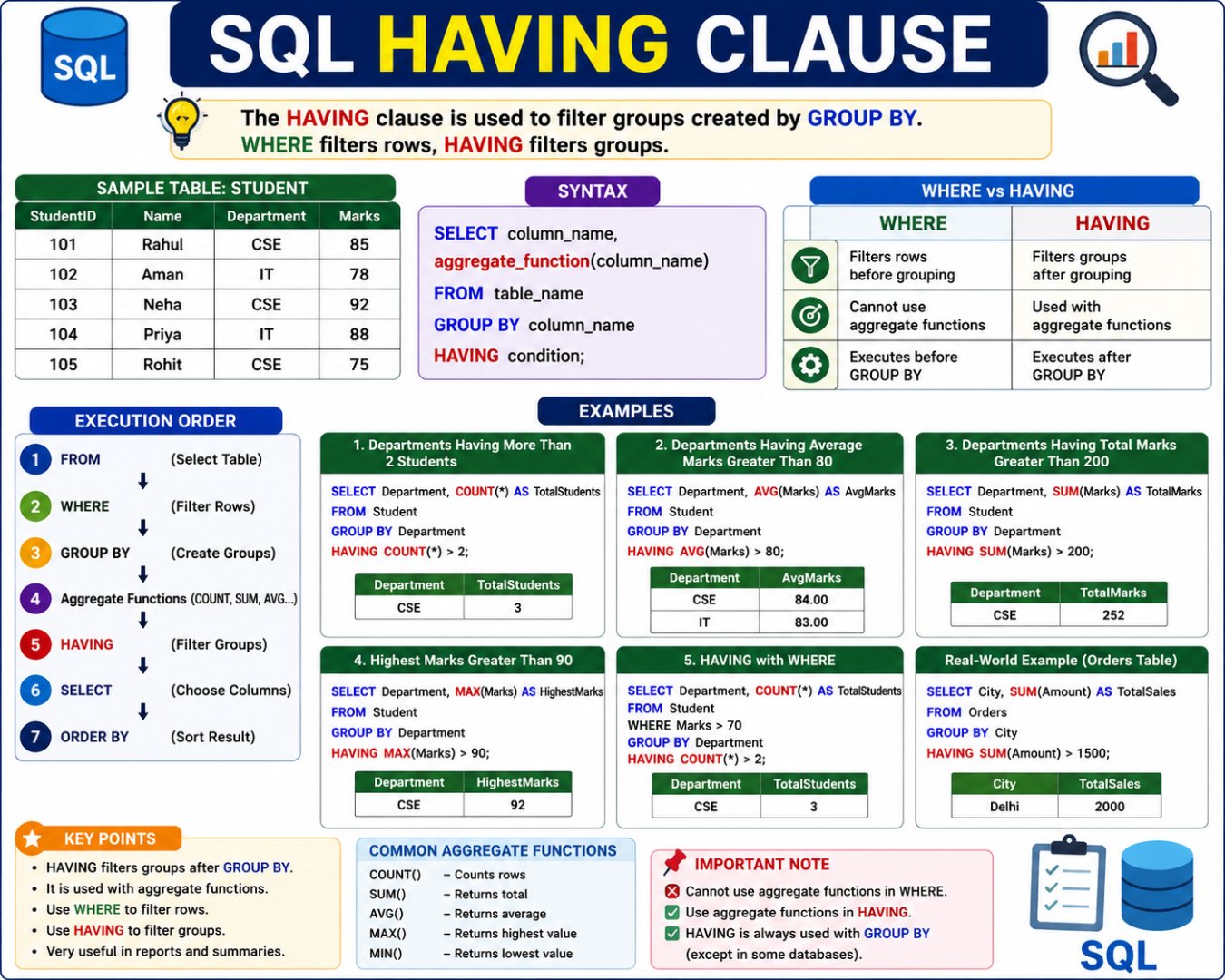
What is HAVING?
The HAVING clause is used to filter grouped data after the GROUP BY clause has been applied.
It is mainly used with Aggregate Functions like:
COUNT()SUM()AVG()MAX()MIN()
Simple Definition
HAVING filters groups, whereas WHERE filters individual rows.
Hindi Explanation
HAVING Clause का उपयोग GROUP BY द्वारा बनाए गए Groups को Filter करने के लिए किया जाता है।
- WHERE → Rows को Filter करता है
- HAVING → Groups को Filter करता है
Why Do We Need HAVING?
Suppose a college wants to display only those departments that have more than 2 students.
Without HAVING, SQL cannot filter aggregate results.
This is where the HAVING clause is used.
Sample Student Table
| StudentID | Name | Department | Marks |
|---|---|---|---|
| 101 | Rahul | CSE | 85 |
| 102 | Aman | IT | 78 |
| 103 | Neha | CSE | 92 |
| 104 | Priya | IT | 88 |
| 105 | Rohit | CSE | 75 |
How HAVING Works
Student Table
      │
      ▼
GROUP BY Department
      │
      ▼
CSE → Rahul, Neha, Rohit
IT  → Aman, Priya
      │
      ▼
HAVING COUNT(*) > 2
      │
      ▼
Only CSE
Syntax
SELECT column_name,
aggregate_function(column_name)
FROM table_name
GROUP BY column_name
HAVING condition;
Example 1: Departments Having More Than 2 Students
Query
SELECT Department,
COUNT(*) AS TotalStudents
FROM Student
GROUP BY Department
HAVING COUNT(*) > 2;
Output
| Department | TotalStudents |
|---|---|
| CSE | 3 |
Explanation
After grouping:
CSE = 3 Students
IT = 2 Students
HAVING checks:
3 > 2 ✔

2 > 2 ✘
Only CSE is displayed.
Example 2: Departments Having Average Marks Greater Than 80
Query
SELECT Department,
AVG(Marks) AS AverageMarks
FROM Student
GROUP BY Department
HAVING AVG(Marks) > 80;
Output
| Department | AverageMarks |
|---|---|
| CSE | 84 |
| IT | 83 |
Both departments satisfy the condition.
Example 3: Departments Having Total Marks Greater Than 200
Query
SELECT Department,
SUM(Marks) AS TotalMarks
FROM Student
GROUP BY Department
HAVING SUM(Marks) > 200;
Output
| Department | TotalMarks |
|---|---|
| CSE | 252 |
Example 4: Highest Marks Greater Than 90
SELECT Department,
MAX(Marks) AS HighestMarks
FROM Student
GROUP BY Department
HAVING MAX(Marks) > 90;
Output
| Department | HighestMarks |
|---|---|
| CSE | 92 |
HAVING with WHERE
You can use both together.
Query
SELECT Department,
COUNT(*) AS TotalStudents
FROM Student
WHERE Marks > 70
GROUP BY Department
HAVING COUNT(*) > 2;
Step 1: WHERE Filters Rows
Rows with marks greater than 70 remain:
| Name | Department | Marks |
|---|---|---|
| Rahul | CSE | 85 |
| Aman | IT | 78 |
| Neha | CSE | 92 |
| Priya | IT | 88 |
| Rohit | CSE | 75 |
Step 2: GROUP BY Creates Groups
CSE = 3 Students

IT = 2 Students
Step 3: HAVING Filters Groups
CSE ✔

IT ✘
Final Output
| Department | TotalStudents |
|---|---|
| CSE | 3 |
Execution Order
Although we write SQL in one order, the database executes it differently.
FROM
   │
   ▼
WHERE
(Filter Rows)
   │
   ▼
GROUP BY
(Create Groups)
   │
   ▼
Aggregate Functions
(COUNT, SUM, AVG...)
   │
   ▼
HAVING
(Filter Groups)
   │
   ▼
SELECT
(Display Columns)
   │
   ▼
ORDER BY
(Sort Result)
WHERE vs HAVING
| WHERE | HAVING |
|---|---|
| Filters individual rows | Filters groups |
| Executes before GROUP BY | Executes after GROUP BY |
| Cannot use aggregate functions directly | Uses aggregate functions |
| Works on raw table data | Works on grouped data |
Example
WHERE
SELECT *
FROM Student
WHERE Marks > 80;
Returns individual students with marks above 80.
HAVING
SELECT Department,
COUNT(*)
FROM Student
GROUP BY Department
HAVING COUNT(*) > 2;
Returns departments with more than two students.
Real-World Example
Suppose an online shopping company stores order details.
Orders Table
| OrderID | City | Amount |
|---|---|---|
| 1 | Delhi | 500 |
| 2 | Delhi | 700 |
| 3 | Mumbai | 900 |
| 4 | Delhi | 800 |
| 5 | Mumbai | 600 |
Query
SELECT City,
SUM(Amount) AS TotalSales
FROM Orders
GROUP BY City
HAVING SUM(Amount) > 1500;
Output
| City | TotalSales |
|---|---|
| Delhi | 2000 |
Only Delhi is displayed because its total sales exceed ₹1500.
Common Mistakes
❌ Using Aggregate Function in WHERE
Incorrect
SELECT Department,
COUNT(*)
FROM Student
WHERE COUNT(*) > 2
GROUP BY Department;
This produces an error because WHERE cannot use aggregate functions directly.
✅ Correct
SELECT Department,
COUNT(*)
FROM Student
GROUP BY Department
HAVING COUNT(*) > 2;
WHERE
↓
Filter Rows
↓
GROUP BY
↓
Create Groups
↓
HAVING
↓
Filter Groups
↓
Final Result
Easy Rule to Remember:
- WHERE = Row Filter
- GROUP BY = Make Groups
- HAVING = Group Filter
💬 Leave a Comment & Rating