What is GROUP BY
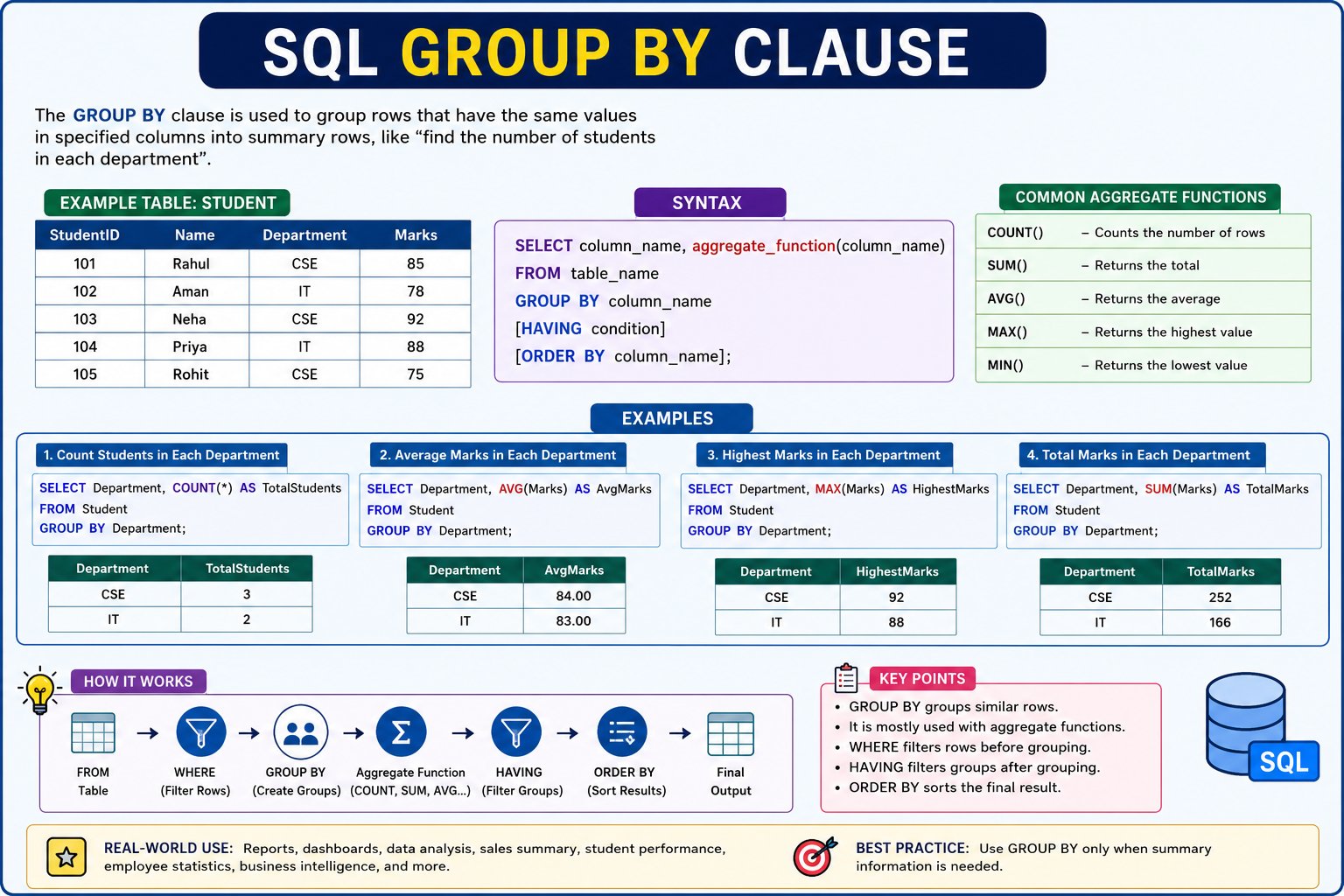
What is GROUP BY?
The GROUP BY clause is used to group rows that have the same value in one or more columns. It is mainly used with Aggregate Functions like COUNT(), SUM(), AVG(), MAX(), and MIN() to generate summary reports.
Simple Definition
Instead of showing every row individually, GROUP BY combines similar rows into groups and performs calculations on each group.
Hindi Explanation
GROUP BY का उपयोग उन records को एक साथ समूह (Group) बनाने के लिए किया जाता है जिनकी किसी column में value समान होती है। इसके बाद SQL हर group पर अलग-अलग calculation करता है।
Why Do We Use GROUP BY?
Imagine a college database with 10,000 students.
If you want to know:
- How many students are in each department?
- What is the average salary in each department?
- What is the total sales for each city?
Using GROUP BY, SQL automatically creates groups and calculates the result for each group.
Sample Table
Student Table
| StudentID | Name | Department | Marks |
|---|---|---|---|
| 101 | Rahul | CSE | 85 |
| 102 | Aman | IT | 78 |
| 103 | Neha | CSE | 92 |
| 104 | Priya | IT | 88 |
| 105 | Rohit | CSE | 75 |
How GROUP BY Works
Without GROUP BY
Rahul   CSE   85
Aman    IT    78
Neha    CSE   92
Priya   IT    88
Rohit   CSE   75
With GROUP BY Department
CSE
 ├── Rahul
 ├── Neha
 └── Rohit

IT
 ├── Aman
 └── Priya
SQL creates separate groups for each department.
Syntax
SELECT column_name, aggregate_function(column_name)
FROM table_name
GROUP BY column_name;
Example 1: Count Students in Each Department
Query
SELECT Department, COUNT(*) AS TotalStudents
FROM Student
GROUP BY Department;
Output
| Department | TotalStudents |
|---|---|
| CSE | 3 |
| IT | 2 |
Explanation
SQL groups all students by department:
CSE → Rahul, Neha, Rohit
Count = 3
IT → Aman, Priya
Count = 2
Example 2: Calculate Average Marks
Query
SELECT Department,
AVG(Marks) AS AverageMarks
FROM Student
GROUP BY Department;
Output
| Department | AverageMarks |
|---|---|
| CSE | 84.00 |
| IT | 83.00 |
Calculation
For CSE
85 + 92 + 75 = 252

252 / 3 = 84
For IT
78 + 88 = 166

166 / 2 = 83
Example 3: Find Highest Marks
SELECT Department,
MAX(Marks) AS HighestMarks
FROM Student
GROUP BY Department;
Output
| Department | HighestMarks |
|---|---|
| CSE | 92 |
| IT | 88 |
SQL finds the maximum marks separately for each department.
Example 4: Find Lowest Marks
SELECT Department,
MIN(Marks) AS LowestMarks
FROM Student
GROUP BY Department;
Output
| Department | LowestMarks |
|---|---|
| CSE | 75 |
| IT | 78 |
Example 5: Calculate Total Marks
SELECT Department,
SUM(Marks) AS TotalMarks
FROM Student
GROUP BY Department;
Output
| Department | TotalMarks |
|---|---|
| CSE | 252 |
| IT | 166 |
GROUP BY with WHERE
WHERE filters rows before grouping.
Query
SELECT Department,
COUNT(*) AS TotalStudents
FROM Student
WHERE Marks > 80
GROUP BY Department;
Step-by-Step
Original Table
| Name | Department | Marks |
|---|---|---|
| Rahul | CSE | 85 |
| Aman | IT | 78 |
| Neha | CSE | 92 |
| Priya | IT | 88 |
| Rohit | CSE | 75 |
After WHERE Marks > 80
| Name | Department |
|---|---|
| Rahul | CSE |
| Neha | CSE |
| Priya | IT |
Now SQL groups the remaining rows.
Output
| Department | TotalStudents |
|---|---|
| CSE | 2 |
| IT | 1 |
GROUP BY with ORDER BY
SELECT Department,
AVG(Marks) AS AverageMarks
FROM Student
GROUP BY Department
ORDER BY AverageMarks DESC;
Output
| Department | AverageMarks |
|---|---|
| CSE | 84 |
| IT | 83 |
The departments are sorted by average marks in descending order.
GROUP BY with HAVING
HAVING filters groups after grouping.
SELECT Department,
COUNT(*) AS TotalStudents
FROM Student
GROUP BY Department
HAVING COUNT(*) > 2;
Output
| Department | TotalStudents |
|---|---|
| CSE | 3 |
Only the CSE group is displayed because it has more than two students.
Execution Order
Student Table
      │
      ▼
WHERE
(Filter Rows)
      │
      ▼
GROUP BY
(Create Groups)
      │
      ▼
Aggregate Function
(COUNT, SUM, AVG...)
      │
      ▼
HAVING
(Filter Groups)
      │
      ▼
ORDER BY
(Sort Results)
      │
      ▼
Final Output
GROUP BY vs ORDER BY
| GROUP BY | ORDER BY |
|---|---|
| Creates groups | Sorts data |
| Reduces rows | Keeps all selected rows |
| Used with aggregate functions | Used to arrange results |
| Generates summary reports | Changes display order only |
Real-World Example
Imagine an e-commerce website.
Orders Table
| OrderID | City | Amount |
|---|---|---|
| 1 | Delhi | 500 |
| 2 | Delhi | 800 |
| 3 | Mumbai | 600 |
| 4 | Delhi | 700 |
| 5 | Mumbai | 900 |
Query
SELECT City,
SUM(Amount) AS TotalSales
FROM Orders
GROUP BY City;
Output
| City | TotalSales |
|---|---|
| Delhi | 2000 |
| Mumbai | 1500 |
This report helps the company compare sales by city.
Common Mistakes
❌ Selecting a column that is not grouped
SELECT Name,
Department,
COUNT(*)
FROM Student
GROUP BY Department;
This causes an error in most SQL databases because Name is neither grouped nor used in an aggregate function.
✅ Correct
SELECT Department,
COUNT(*)
FROM Student
GROUP BY Department;
💬 Leave a Comment & Rating