What is DML
Definition (English)
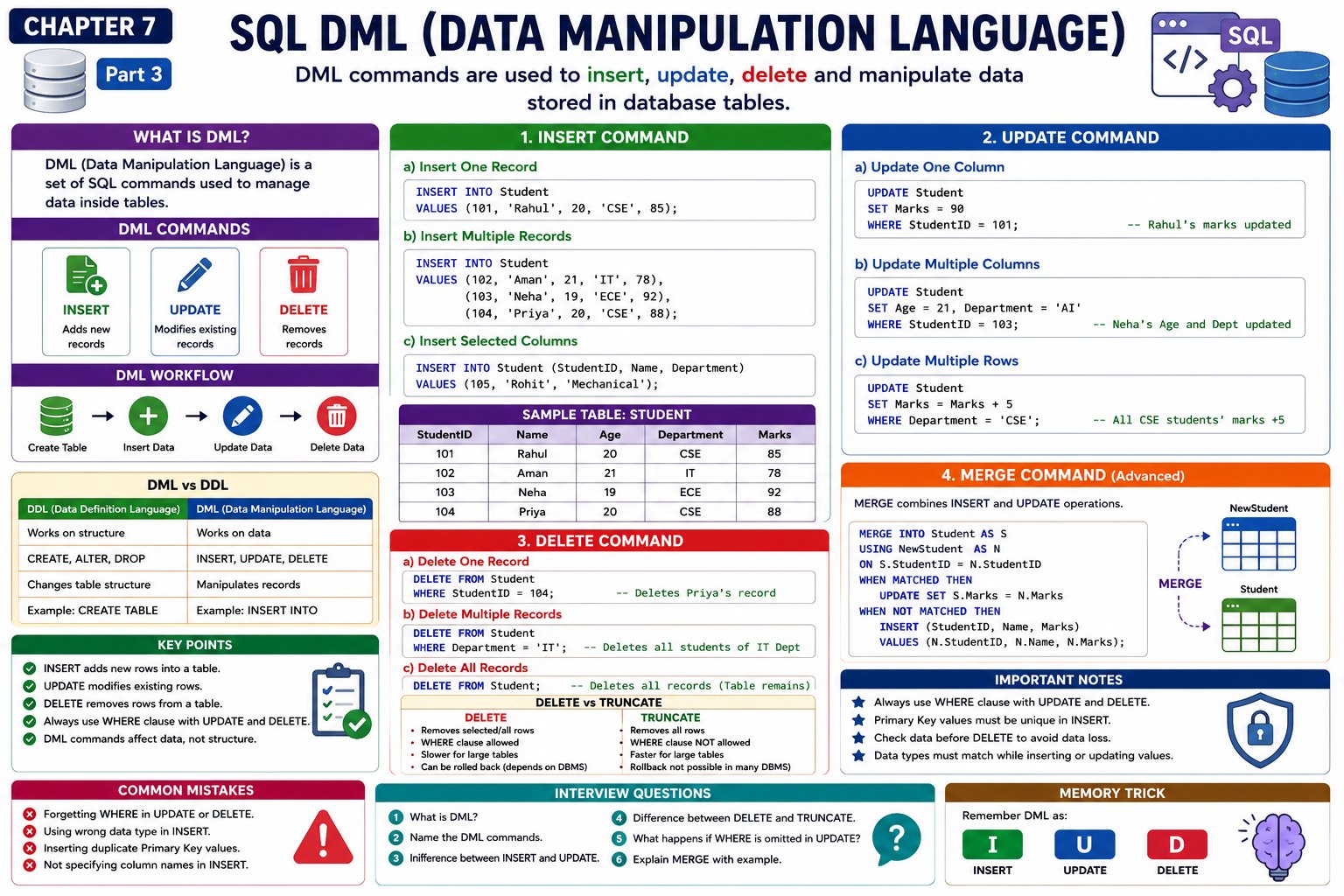
DML (Data Manipulation Language) is a set of SQL commands used to insert, update, delete, and manipulate data stored in database tables.
Definition (Hindi)
DML (Data Manipulation Language) SQL Commands का एक समूह है जिसका उपयोग Database Table में Data जोड़ने (Insert), बदलने (Update), हटाने (Delete) और Manage करने के लिए किया जाता है।
Simple Definition
DDL builds the house, DML arranges the furniture inside the house.
Difference Between DDL and DML
| DDL | DML |
|---|---|
| Works on database structure | Works on table data |
| Creates or modifies tables | Inserts, updates, deletes records |
| Examples: CREATE, ALTER | Examples: INSERT, UPDATE, DELETE |
DML Commands
The main DML commands are:
          DML
           │
 ┌─────────┼─────────┐
 │         │         │
INSERT   UPDATE   DELETE
Some databases also support:
- MERGE
- REPLACE (MySQL)
- UPSERT (PostgreSQL)
Sample Table Used Throughout This Chapter
CREATE TABLE Student
(
    StudentID INT PRIMARY KEY,
    Name VARCHAR(50),
    Age INT,
    Department VARCHAR(30),
    Marks INT
);
Initially, the table is empty.
INSERT Command
What is INSERT?
The INSERT command adds new records into a table.
Syntax
INSERT INTO TableName
VALUES(Value1, Value2, Value3);
Example 1 – Insert One Record
INSERT INTO Student
VALUES
(101,'Rahul',20,'CSE',85);
Result
| StudentID | Name | Age | Department | Marks |
|---|---|---|---|---|
| 101 | Rahul | 20 | CSE | 85 |
Example 2 – Insert Multiple Records
INSERT INTO Student
VALUES
(102,'Aman',21,'IT',78),
(103,'Neha',19,'ECE',92),
(104,'Priya',20,'CSE',88);
Result
| StudentID | Name | Age | Department | Marks |
|---|---|---|---|---|
| 101 | Rahul | 20 | CSE | 85 |
| 102 | Aman | 21 | IT | 78 |
| 103 | Neha | 19 | ECE | 92 |
| 104 | Priya | 20 | CSE | 88 |
Example 3 – Insert Selected Columns
Suppose Age is optional.
INSERT INTO Student
(StudentID, Name, Department)

VALUES

(105,'Rohit','Mechanical');
Result
| StudentID | Name | Age | Department |
|---|---|---|---|
| 105 | Rohit | NULL | Mechanical |
Rules of INSERT
- Values must match the column order unless columns are specified.
- Data types must be compatible.
- Primary Key values must be unique.
- NOT NULL columns must receive values.
UPDATE Command
What is UPDATE?
The UPDATE command changes existing data in one or more rows.
Syntax
UPDATE TableName

SET ColumnName = Value

WHERE Condition;
Example 1 – Update One Record
UPDATE Student

SET Marks = 90

WHERE StudentID = 101;
Before
| StudentID | Marks |
|---|---|
| 101 | 85 |
After
| StudentID | Marks |
|---|---|
| 101 | 90 |
Example 2 – Update Multiple Columns
UPDATE Student

SET Age = 21,
Department = 'AI'

WHERE StudentID = 103;
Example 3 – Update Multiple Rows
UPDATE Student

SET Marks = Marks + 5

WHERE Department = 'CSE';
Before
| Name | Department | Marks |
|---|---|---|
| Rahul | CSE | 85 |
| Priya | CSE | 88 |
After
| Name | Department | Marks |
|---|---|---|
| Rahul | CSE | 90 |
| Priya | CSE | 93 |
Important Note
Never forget the WHERE clause unless you intentionally want to update every row.
Incorrect:
UPDATE Student

SET Marks = 100;
This changes all students' marks to 100.
DELETE Command
What is DELETE?
The DELETE command removes records from a table.
Syntax
DELETE FROM TableName

WHERE Condition;
Example 1 – Delete One Record
DELETE FROM Student

WHERE StudentID = 104;
Before
| StudentID | Name |
|---|---|
| 104 | Priya |
After
Record deleted.
Example 2 – Delete All Records
DELETE FROM Student;
Result
- All rows removed.
- Table structure remains.
DELETE vs TRUNCATE
| DELETE | TRUNCATE |
|---|---|
| Deletes selected or all rows | Deletes all rows only |
| WHERE clause allowed | WHERE clause not allowed |
| Slower for large tables | Faster for large tables |
| Can often be rolled back before COMMIT (DBMS-dependent) | Rollback behavior depends on the DBMS |
| Table structure remains | Table structure remains |
MERGE Command (Advanced)
The MERGE command combines INSERT, UPDATE, and sometimes DELETE into a single operation.
It is commonly used in SQL Server and Oracle.
Example:
MERGE INTO Employee E

USING NewEmployee N

ON E.EmpID = N.EmpID

WHEN MATCHED THEN
UPDATE SET E.Name = N.Name

WHEN NOT MATCHED THEN
INSERT(EmpID, Name)
VALUES(N.EmpID, N.Name);
DML Workflow
Create Table
      │
      ▼
Insert Records
      │
      ▼
Update Records
      │
      ▼
Delete Records
Real-Life Example
Suppose a college database stores student information.
New student joins
INSERT INTO Student
VALUES(106,'Karan',19,'CSE',80);
Student changes department
UPDATE Student

SET Department = 'IT'

WHERE StudentID = 106;
Student leaves college
DELETE FROM Student

WHERE StudentID = 106;
Common Mistakes
Forgetting WHERE
UPDATE Student

SET Marks = 100;
All records will be updated.
Duplicate Primary Key
INSERT INTO Student
VALUES(101,'Amit',20,'CSE',75);
Error because StudentID 101 already exists.
Wrong Data Type
INSERT INTO Student
VALUES(107,'Ravi','Twenty','CSE',80);
Error because Age should be an integer.
💬 Leave a Comment & Rating