What is DDL
Definition (English)
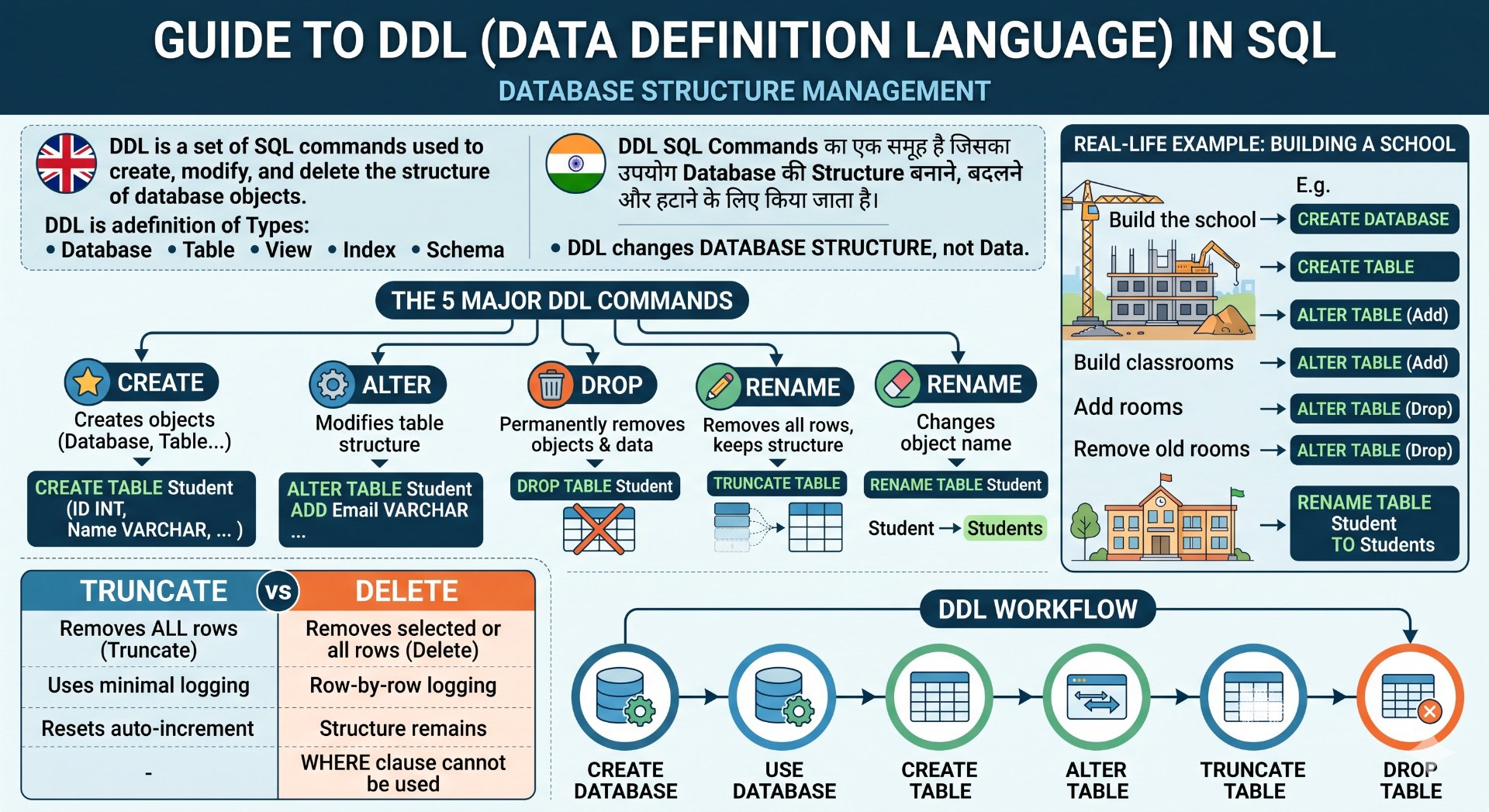
DDL (Data Definition Language) is a set of SQL commands used to create, modify, and delete the structure of database objects.
Database objects include:
- Database
- Table
- View
- Index
- Schema
Definition (Hindi)
DDL (Data Definition Language) SQL Commands का एक समूह है जिसका उपयोग Database की Structure (संरचना) बनाने, बदलने और हटाने के लिए किया जाता है।
Simple Definition
DDL = Database Structure Management Commands
DDL Data को नहीं, बल्कि Database की Structure को बदलता है।
Real-Life Example
Imagine you are constructing a new school.
Before students can study, you need to:
- Build the school 🏫
- Build classrooms 🏫
- Add rooms ➕
- Remove old rooms ❌
- Rename rooms ✏️
Similarly, in SQL:
- Create Database
- Create Table
- Add Column
- Delete Table
- Rename Table
All of these are DDL operations.
DDL Commands
There are five major DDL commands.
          DDL Commands
                │
     ┌──────────┼──────────┐
     │          │          │
  CREATE     ALTER      DROP
     │
     ├──────────┬──────────┐
     │          │
 TRUNCATE    RENAME
Characteristics of DDL
-
Changes the database structure.
- Executes automatically (auto-commit in many DBMSs).
- Usually cannot be rolled back after execution (depends on DBMS).
- Does not directly manipulate row data.
CREATE Command
Definition
The CREATE command creates new database objects.
It can create:
- Database
- Table
- View
- Index
- Schema
CREATE DATABASE
Syntax
CREATE DATABASE DatabaseName;
Example
CREATE DATABASE CollegeDB;
Database Created:
CollegeDB
Using the Database
(MySQL / SQL Server)
USE CollegeDB;
Now all operations happen inside CollegeDB.
CREATE TABLE
Syntax
CREATE TABLE TableName
(
Column1 DataType,
Column2 DataType,
Column3 DataType
);
Example
CREATE TABLE Student
(
StudentID INT PRIMARY KEY,

Name VARCHAR(50),

Age INT,

Department VARCHAR(30)
);
Student Table Structure
| StudentID | Name | Age | Department |
|---|
Currently, the table is empty.
Data Types Used
| Data Type | Purpose |
|---|---|
| INT | Integer numbers |
| VARCHAR | Variable-length text |
| CHAR | Fixed-length text |
| DATE | Date |
| FLOAT | Decimal numbers |
| BOOLEAN | True/False |
ALTER Command
Definition
ALTER modifies an existing table.
It is used to:
- Add Column
- Modify Column
- Drop Column
- Rename Column
ALTER ADD COLUMN
Suppose the Student table contains:
| StudentID | Name | Age |
Now we want to add Email.
Syntax
ALTER TABLE Student

ADD Email VARCHAR(100);
Before
| StudentID | Name | Age |
After
| StudentID | Name | Age | Email |
ALTER MODIFY COLUMN
Change Age from INT to SMALLINT.
ALTER TABLE Student

MODIFY Age SMALLINT;
Note: In SQL Server, use
ALTER COLUMNinstead ofMODIFY.
ALTER DROP COLUMN
Remove Email column.
ALTER TABLE Student

DROP COLUMN Email;
Before
| StudentID | Name | Age | Email |
After
| StudentID | Name | Age |
ALTER RENAME COLUMN
(Rename syntax depends on the DBMS.)
Example (MySQL 8+)
ALTER TABLE Student

RENAME COLUMN Name TO StudentName;
DROP Command
Definition
DROP permanently removes a database object.
It removes:
- Table
- Database
- View
- Index
DROP TABLE
DROP TABLE Student;
Result
❌ Student table deleted permanently.
DROP DATABASE
DROP DATABASE CollegeDB;
Result
Entire database deleted.
Warning
DROP removes:
- Structure ❌
- Data ❌
Nothing remains.
DROP Diagram
Before

Student Table

↓

DROP TABLE

↓

Nothing remains
TRUNCATE Command
Definition
TRUNCATE removes all rows from a table while keeping its structure.
Example
Before
| ID | Name |
|---|---|
| 101 | Rahul |
| 102 | Aman |
| 103 | Neha |
Command
TRUNCATE TABLE Student;
After
| ID | Name |
(No rows)
Important
TRUNCATE:
✔ Deletes all records
✔ Keeps table structure
✔ Usually resets auto-increment counters (DBMS-dependent)
DELETE vs TRUNCATE
| DELETE | TRUNCATE |
|---|---|
| Removes selected rows (or all rows if no WHERE clause) | Removes all rows |
| WHERE can be used | WHERE cannot be used |
| Slower for large tables | Faster for large tables |
| Logs row-by-row operations (DBMS-dependent) | Typically uses minimal logging (DBMS-dependent) |
| Structure remains | Structure remains |
RENAME Command
Definition
Changes the name of a database object.
Example
RENAME TABLE Student

TO Students;
Old Name
Student
↓
New Name
Students
Note: Rename syntax varies by DBMS. For example, SQL Server commonly uses
sp_rename.
Complete DDL Workflow
CREATE DATABASE

↓

USE DATABASE

↓

CREATE TABLE

↓

ALTER TABLE

↓

TRUNCATE TABLE

↓

DROP TABLE
Example
Create Database
CREATE DATABASE CompanyDB;
Use Database
USE CompanyDB;
Create Table
CREATE TABLE Employee
(
EmpID INT PRIMARY KEY,

Name VARCHAR(50),

Salary INT
);
Add Column
ALTER TABLE Employee

ADD Department VARCHAR(30);
Delete All Data
TRUNCATE TABLE Employee;
Delete Table
DROP TABLE Employee;
DDL Command Summary
| Command | Purpose |
|---|---|
| CREATE | Creates database objects |
| ALTER | Modifies table structure |
| DROP | Deletes database objects permanently |
| TRUNCATE | Removes all rows but keeps structure |
| RENAME | Changes object name |
💬 Leave a Comment & Rating